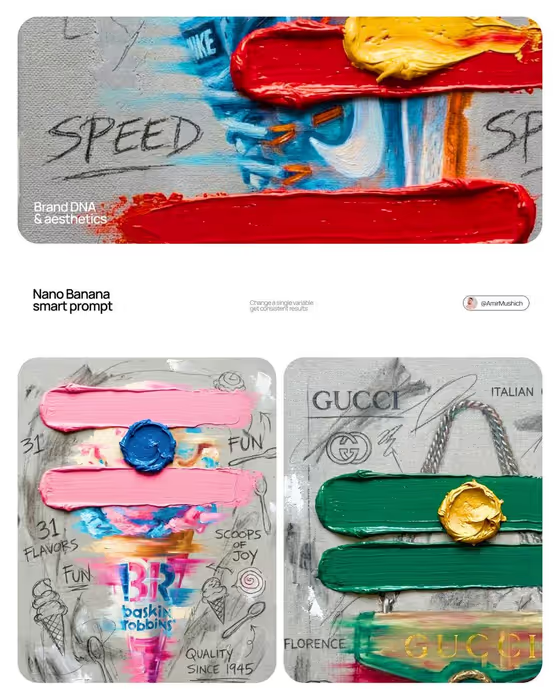
Brand Impasto Oil Painting turns a brand into a mixed-media ad painted on raw grey canvas. A vertical product is rendered in blurred horizontal brushstrokes, crossed by two thick impasto bars and topped with a raised dollop of contrasting paint, as in the Baskin-Robbins and Gucci style examples on the cover.
It is built for designers, marketers, small brand owners and creative studios who want a hand-made, pop-art look for a campaign, mood board or social post. The colors, product, logo and charcoal scribbles are all adapted from the brand identity you provide, and the result comes out as a 3:4 image.
What works best as input
- In the Brand Identity field you can describe the brand in words or add an exact visual reference. A logo or product photo gives the painting something concrete to follow.
- If you type a description, name the kind of brand and its character, for example 'A sustainable outdoor label' or 'A boutique hospitality brand'. The template uses this to pick the product, the palette and the handwritten keywords.
- Choose a reference where the brand colors are clear and consistent. The two main strokes use the primary brand color and the center dollop uses a contrasting secondary color, so a muddy or multicolor reference makes that choice harder.
- Pick a reference that shows the logo or a recognizable product shape. The template paints the logo in distressed, semi-transparent layers inside the object's silhouette.
- The Setting field is a choice list only, so select one of the offered options such as 'A clean studio' rather than trying to upload anything there.
How to use it
- Open the Brand Impasto Oil Painting template in Phosphene.
- Fill in Brand Identity by describing the brand or adding a visual reference, then pick an option in Setting.
- Generate the image and wait for the 3:4 canvas painting to finish.
- Review the result: check that the stroke colors match your brand, the product reads clearly, and the charcoal text and icons feel related to the brand. Adjust your inputs and generate again if needed.
Tips for a better result
- Be specific about the brand's personality. A more distinct description gives the charcoal slogans and hand-drawn icons more relevant material to work with.
- Run the same Brand Identity with different Setting options to compare variations while keeping the palette and style consistent.
- Use a clear visual reference when you need exact brand colors, since a written description leaves the palette more open to interpretation.
- Try several brands in a row to build a matching series, like the paired Baskin-Robbins and Gucci panels on the cover.
Common mistakes
- Entering a vague brand description with no product or color cues, which leaves the painting generic and the palette hard to predict.
- Using a reference image with many competing colors or a tiny, unreadable logo, so the strokes and the painted logo lose clarity.
- Expecting a flat vector or photographic logo. The branding is deliberately painted as distressed, semi-transparent oil layers.
FAQ
Do I need to upload a photo?
The Brand Identity field accepts either a written description or an exact visual reference. The Setting field is a list of options only.
How does it choose the colors?
The template analyzes the brand identity you give it. It uses the primary brand color for the two horizontal impasto strokes and a contrasting secondary color for the raised dollop of paint.
What shape is the output?
The result is a single image in 3:4 aspect ratio, styled as a textured canvas painting.
What is the text and doodling on the canvas?
It is charcoal and graphite handwriting with keywords, slogans and simple icons tied to your brand, drawn to look scratched over the dried oil paint.