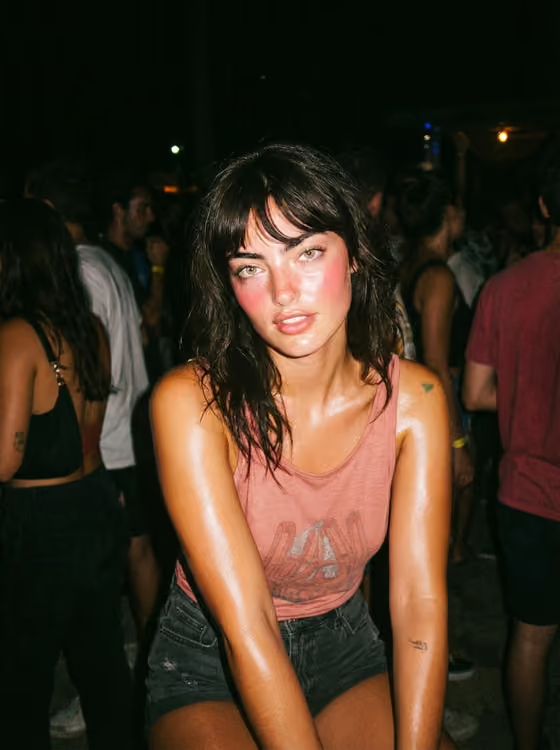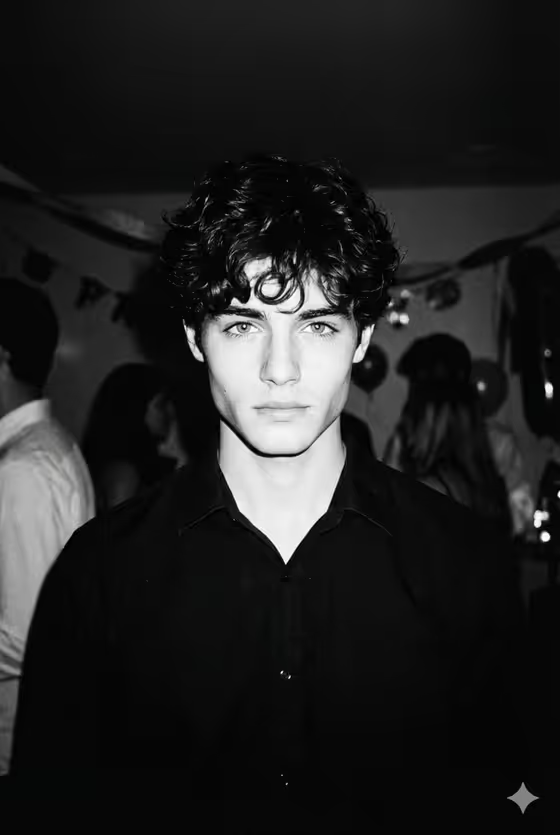
Disposable Flash Siren turns a subject into a black-and-white portrait that looks like it came off a 1990s disposable camera at a house party. Expect harsh direct flash, visible grain, a nearly black background and a close, unflinching stare, much like the cover image with its curly hair, pale eyes and blurred crowd behind.
It suits anyone who wants a moody, candid nightlife look for a profile picture, a character concept, a mood board or a creative post. It works for a real person from a photo or for an invented subject you describe in words.
What works best as input
- The Portrait Subject field accepts either a text description or a photo reference, so choose whichever fits. A photo is the better option when you want the result to keep a specific face.
- If you upload a photo, pick a clear, close shot with the face fully visible and the eyes unobstructed, since the template centers on the eyes and gaze.
- Even, readable lighting in the source helps more than a dark or heavily filtered image, because the template adds its own hard flash and shadow.
- If you describe the subject instead, be concrete about hair, jaw and age, for example 'a curly-haired young man' or 'a mysterious woman with intense eyes'.
- Only upload photos of yourself or people who have agreed to it, and keep the description respectful.
How to use it
- Open the Disposable Flash Siren template in Phosphene.
- Fill in Portrait Subject by typing a short description or adding a photo reference of the person you want pictured.
- Fill in House-Party Stare with the expression you want, such as 'heavy-lidded look into lens' or 'still face under harsh flash'.
- Generate the image, then check the eyes, the flash contrast and the dark background, and adjust your two fields and run it again if something is off.
Tips for a better result
- Try the example stares as starting points, like 'close stare amid dark crowd blur', to see how much the expression changes the mood.
- Keep the stare short and specific. One clear expression reads better than a long list of feelings.
- Vary the subject wording (sharp-jawed, androgynous, curly-haired) to get different faces and silhouettes while keeping the same gritty flash style.
- If the first result feels too soft, make the stare more controlled and direct, since the template is built around a close, composed gaze.
Common mistakes
- Writing a vague subject like 'a person'. Without distinguishing details the portrait loses the sharp curls, jaw or eyes that the template emphasizes.
- Asking for a smiling, glossy or studio-lit look in the stare field. That works against the harsh flash, grain and deep shadow the template is designed for.
- Using a cropped, blurry or heavily obscured photo as the reference, which gives the template little face to work with.
FAQ
Do I have to upload a photo?
No. Portrait Subject accepts a text description or a photo reference, so you can type something like 'a curly-haired young man' instead.
Can I get a color result?
This template is built for black-and-white output with disposable-camera grain and contrast, so color is not part of its design.
What shape is the image?
The template outputs a single image in a 3:4 portrait aspect ratio.
What goes in the House-Party Stare field?
Describe the expression or gaze, for example 'direct predatory gaze' or 'heavy-lidded look into lens'. It is a text-only field, so photos are not used there.