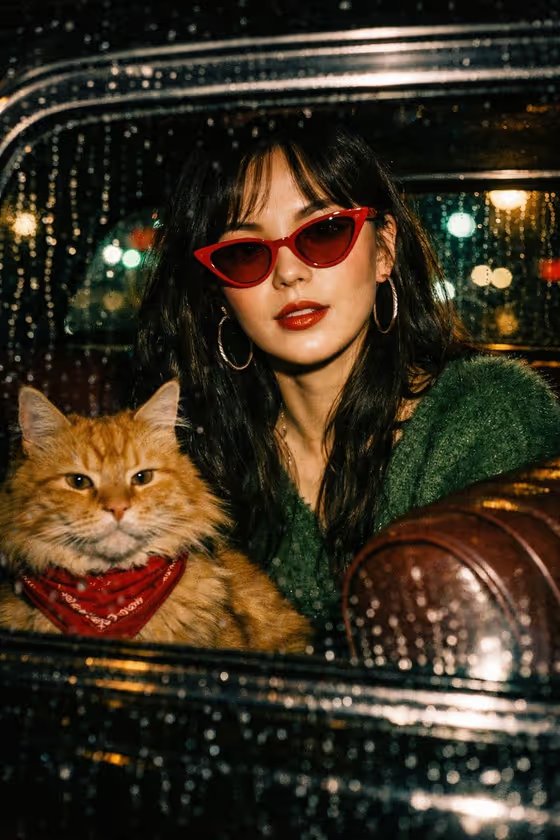
Rain Window Flash turns a portrait into a retro flash photo taken through a rain-covered car window at night. In the cover, a woman in red cat-eye sunglasses and a fuzzy green sweater sits in a vintage car beside a fluffy orange tabby cat in a red bandana, with green and teal city lights blurred behind the wet glass.
It suits anyone who wants a moody, 90s film-style portrait with a cinematic Hong Kong feel. The look is fixed (flash, high contrast, film grain, 35mm texture), so you mainly choose who the subject is and how the scene is framed. The result is a 9:16 vertical image.
What works best as input
- Upload one clear photo of the person you want in the scene, since the first field accepts a photo as the subject reference. Use a sharp, well-lit shot where the face is fully visible.
- A front-facing or slightly angled portrait works best, because the final image is an eye-level shot through glass.
- Avoid group photos or crowded frames so it is obvious which person should appear in the car.
- If you would rather type, describe the subject in the first field in a short phrase, like the placeholder 'a stylish woman in a vintage car'. Keep it to who or what the subject is rather than a long scene description.
- Choose a photo whose hair and face are not hidden by hats or heavy shadows, so the subject reads clearly under the flash look.
How to use it
- Open the Rain Window Flash template in Phosphene.
- In the subject field, upload your photo or type a short description of the person you want in the car.
- In the Pose and scene field, pick the framing you want, such as an intimate close portrait, a full-body editorial frame, or an environmental candid frame.
- Generate the image, then check the result for the rain on the glass, the cat in the red bandana, and how well the subject matches your reference.
Tips for a better result
- Try different Pose and scene options with the same photo to compare a tight close portrait against a wider candid frame.
- Use a reference photo with a clear, defined face so the subject stays recognizable once the flash, grain and bokeh are applied.
- If you type your subject instead of uploading, keep the description simple and specific, like 'an editorial portrait subject', and let the template handle the styling.
- Generate a few versions and keep the one where the cat, glass reflections and subject sit together most naturally.
Common mistakes
- Writing a long scene description in the subject field. The car, rain, cat and lighting are already set by the template, so extra scene details can clash with it.
- Uploading a dark, blurry or heavily filtered photo, which gives the template little to work with and can make the subject look muddy.
- Expecting the outfit, cat or color palette to change. The look is fixed, so only the subject and framing are yours to adjust.
FAQ
Do I have to upload a photo?
No. The subject field accepts either an uploaded photo or a short text description, so you can use whichever fits.
Can I change the cat or the car?
The template keeps the vintage car, rainy window and the orange tabby in a red bandana as fixed parts of the look. You control the subject and the pose and scene framing.
What shape is the image?
It is a vertical 9:16 image, which suits phone screens and stories.
What does the Pose and scene field do?
It sets how the shot is framed, with options like an intimate close portrait, a full-body editorial frame or an environmental candid frame, without changing the core retro flash style.