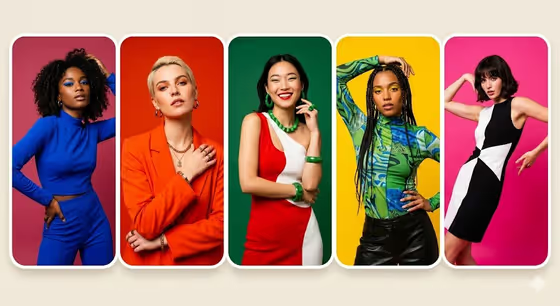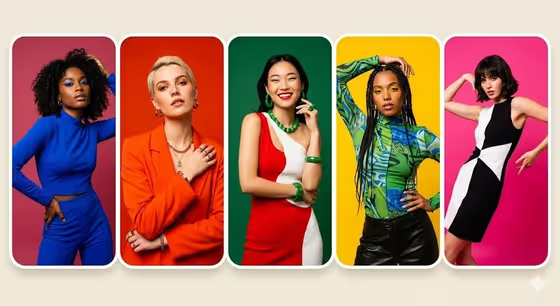
This template builds a five-panel editorial collage of one model, with each panel in a different pose and set against its own bold, single-color background. The panels sit in a rounded grid, and the finished image comes out in a 3:4 aspect ratio.
It suits fashion and marketing work where you want a lookbook-style layout, a campaign teaser, or a colorful portrait series without setting up five separate shoots. You can describe the cast in words or use a portrait reference as the lead subject.
What works best as input
- For the Portrait subject or model field, you can either type a description (for example, one fashion model across five poses) or use a lead portrait reference, since the field accepts a photo.
- If you use a photo, pick a clear, well-lit portrait where the face is fully visible and not covered by sunglasses, hats, or heavy shadow.
- A single person per photo works best, because the template is built around one model repeated across five poses.
- Only use photos of yourself or people who have agreed to be featured, and keep the styling in your reference close to what you want to see in the grid.
- If you describe instead of uploading, mention styling cues such as outfit, jewelry, or hair, so the five panels feel coordinated.
How to use it
- Open the Five-Panel Color Portrait Grid template in Phosphene.
- In Portrait subject or model, describe the cast or add your lead portrait reference.
- In Panel color palette, enter the five colors you want, such as pink, red, green, yellow and cobalt.
- Generate the image, then check that all five panels read clearly and that the colors match your palette.
Tips for a better result
- Pick five colors with strong contrast against each other, like the bright cobalt, orange, green, yellow and pink mix in the cover, so each panel stands apart.
- Try a muted palette such as muted rose, rust, sage, ochre and slate for a softer, more editorial feel.
- Add styling details to the subject field (bold accessories, patterned tops, statement jewelry) so the outfit gives each panel visual interest against the flat backgrounds.
- Rerun with a different palette and the same subject to build a set of variations for comparison.
Common mistakes
- Choosing colors that are too similar, which makes the five panels blend together instead of reading as distinct blocks.
- Using a cropped, blurry, or heavily shadowed reference photo, which gives the model less to work with for keeping the face consistent across poses.
- Describing several different people in the subject field when the template is designed around one model in five poses.
FAQ
Do I have to upload a photo?
No. The Portrait subject or model field accepts a text description, or you can use a lead portrait reference. Either way works.
How many panels will I get?
The template is set up for exactly five portrait panels in a rounded grid, with the pose, gaze, and crop varying between them.
Can I choose my own background colors?
Yes. The Panel color palette field is where you list the five colors, for example coral, violet, teal, cream and black.
What shape is the final image?
The output is an image in a 3:4 aspect ratio.