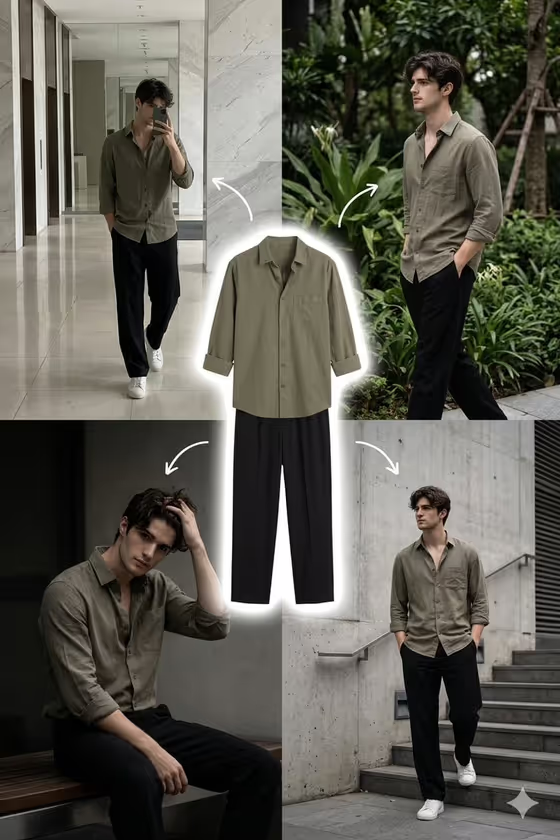
This template builds a five-panel fashion collage around a single outfit. The garments float as a clean cutout in the center with a thin white glow, and four photographs of the same person wearing that exact look surround it, each in a different real-feeling location. Curved white arrows lead from every lifestyle frame back to the center piece.
It suits fashion creators, small clothing sellers, stylists and anyone who wants to show how one outfit works across a day out. The result is a 3:4 image with muted color, soft natural light and a consistent warm grade, so the four scenes read as one set.'
What works best as input
- For Portrait subject, either describe the person in a short phrase (like 'a relaxed male model') or upload a clear identity reference. A sharp, well-lit photo of the face works better than a distant or heavily filtered shot.
- Because the template asks for 2+ photos, plan to supply both a person reference and an outfit reference. Choose an outfit photo where the garments are fully visible, flat or on a hanger, like the shirt and trousers cutout in the center of the cover.
- For Streetwear product outfit, be specific about every piece and its color, for example 'olive shirt, black trousers, and white sneakers'. Naming each item helps keep the outfit identical across all four scenes.
- Four lifestyle locations and Pose sequence are text-only fields, so type them rather than uploading anything. List four locations and four poses in matching order, such as 'marble lobby, greenery, bench, and city stairs' with 'mirror walk, hands in pockets, seated lean, casual stride'.
How to use it
- Open the Five-Scene Outfit Collage template in Phosphene.
- Fill in Portrait subject with a short description or an identity photo, then add your outfit in Streetwear product outfit as text or a styling reference photo.
- Type your four places into Four lifestyle locations and your four poses into Pose sequence, keeping both lists in the same order so each pose lands in the right setting.
- Generate the collage, then check that the outfit looks the same in every panel and that the center cutout is clean before saving.
Tips for a better result
- Pair each pose with a location that makes sense for it. A seated lean fits a bench or ledge, while a stair walk fits steps or a plaza.
- Pick locations with different textures, like polished stone, foliage, dark concrete and open stairs, so the four panels feel distinct while the warm grading keeps them cohesive.
- Try the example outfits as starting points, such as 'stone overshirt, dark denim, and trainers', then adjust colors to match your real garments.
- Keep outfit colors muted and simple. The template leans on muted fashion color, so tones like olive, charcoal and stone tend to sit well with the grade.
Common mistakes
- Leaving the outfit vague, like 'casual clothes'. Without named pieces and colors, the garments can drift between panels.
- Writing fewer or more than four locations or poses. The layout has exactly four lifestyle frames, so mismatched lists make the scenes and poses fall out of sync.
- Uploading a blurry or heavily cropped outfit photo, which makes the center cutout and the repeated clothing less accurate.
FAQ
Do I have to upload photos?
The upload requirement is 2+ photos. Portrait subject and Streetwear product outfit both accept a photo, and you can also describe them in text. Four lifestyle locations and Pose sequence are text only.
Can I change the layout or the arrows?
No. The center outfit cutout, white outline glow, curved arrows and four surrounding frames are fixed direction. You control the person, outfit, locations and poses.
What shape is the final image?
It is a single 3:4 image with five parts: the outfit in the center and four lifestyle photographs around it.
Can I use this for a brand or shop?
Yes, it is in the Product category and works well for showing one outfit in several settings. Use your own garments and a subject you have permission to depict.