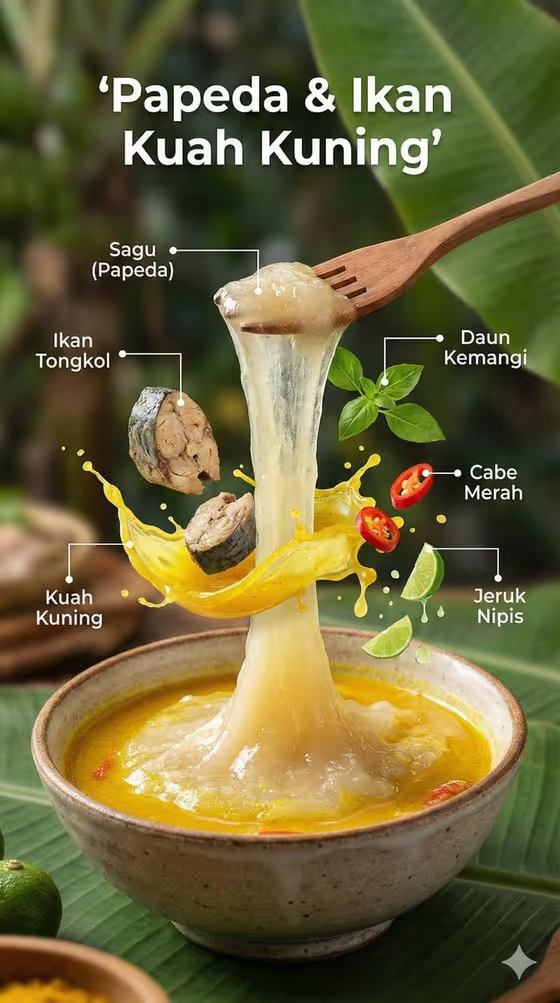
This template turns a single dish into a floating ingredient poster. The finished dish sits in a ceramic bowl on a wooden surface, while its key ingredients hang in the air above it, each one separated and labeled with thin pointer lines. Steam rises from the bowl and sauce splashes are frozen mid-motion, much like the papeda and yellow fish soup on the cover.
It suits food bloggers, restaurant owners, recipe creators and anyone who wants a clean editorial-style picture of a regional dish that also explains what goes into it. The output is a 3:4 vertical image, so it fits poster layouts and story-style formats.
What works best as input
- In the dish field, name the dish specifically, for example a traditional regional dish or a regional specialty, rather than just writing 'soup' or 'rice'. A precise name helps the template pick the right ingredients to float.
- If you have a reference photo of your exact food or drink, upload it so the bowl contents match the real dish. This is especially useful for chef-made variations that look different from the standard version.
- Use a clear, well-lit photo where the dish and its main components are easy to see. Avoid heavy filters or cluttered backgrounds in the reference.
- If you type instead of uploading, mention the distinctive parts of the dish (a signature sauce, a garnish, a main protein) so those can show up among the floating items.
How to use it
- Open the Floating Ingredient Dish template in Phosphene.
- In the dish field, type the name of your dish or upload a reference photo of it.
- Pick a Food presentation option, such as plated hero composition, ingredient motion moment or texture-focused close-up, depending on how you want the image framed.
- Generate the image, then check that the bowl, the floating ingredients and the labels look right before saving or sharing.
Tips for a better result
- Try the same dish with different Food presentation options. The ingredient motion moment gives a more dynamic splash, while the texture-focused close-up emphasizes surfaces and sauces.
- Choose dishes with a few visually distinct ingredients (a protein, herbs, chilies, citrus). Contrasting colors and shapes read better when they float apart.
- Dishes with a glossy sauce or broth work well, since the template adds splash effects and rising steam.
- Generate a few versions and compare the label placement and ingredient balance, then keep the cleanest layout.
Common mistakes
- Writing a vague dish name, which leaves the template guessing at ingredients and can produce floating items that do not belong to your dish.
- Uploading a dark, blurry or heavily cropped reference photo, which makes it harder to reproduce the real look of the food.
- Expecting every label to be perfectly spelled or exact. Always read the labels in the result before using the image publicly.
FAQ
Can I upload a photo of my own dish?
Yes. The dish field accepts either a text description or an uploaded reference of your exact food or drink.
Do I have to choose a Food presentation?
Yes, it is a required field. You can pick one of the listed options to set how the image is framed.
What shape is the final image?
It is a vertical 3:4 image, with the bowl at the bottom and the ingredients floating above it.
Will the labels match my ingredients?
The template adds pointer lines and readable labels for the floating ingredients, but you should review the text in the result to confirm it fits your dish.