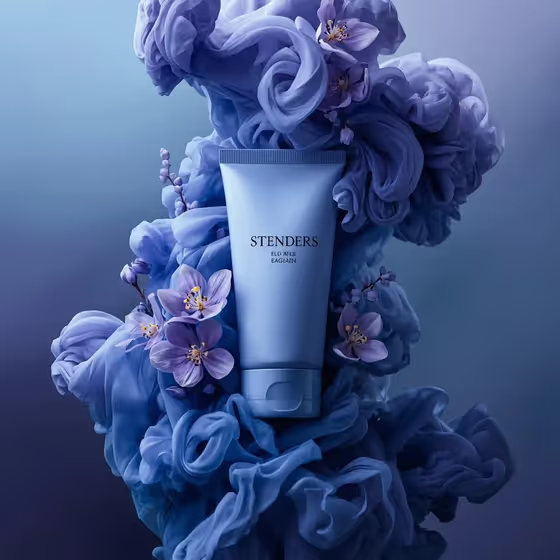
Floral Smoke Cosmetic Ad turns a single cosmetic package into a polished product shot. The item stands upright in the center, surrounded by layered, ink-like smoke clouds with fresh flowers woven through the vapor, as in the cover image of a pale blue tube set in periwinkle smoke and lilac blossoms.
It suits anyone who needs a beauty or skincare visual in a 3:4 frame: small brands, sellers mocking up a launch, or creators building a campaign look. You choose the product, the color family of the smoke, and the flowers, and the template handles the lighting and composition.
What works best as input
- For the Cosmetic product field, either describe the package in plain words (for example a satin squeeze tube, a frosted perfume bottle or a glass skincare jar) or upload a reference photo of the real item.
- If you upload a reference, use a clear, well-lit shot of the package standing upright and facing the camera, so its shape and label area are easy to read.
- The template asks for 2 or more photos, so supply a reference for the product and also one for the Flower family field, which accepts a photo as well as a description.
- For the Flower family, name specific flowers such as lilac and violet blossoms, orchids and jasmine, or dahlias and small wildflowers rather than just saying flowers.
- Pick a Monochrome smoke palette that suits the product's own color, for example periwinkle, lavender and indigo for a blue package, so the smoke and package feel related.
How to use it
- Open the Floral Smoke Cosmetic Ad template in Phosphene.
- Fill in the Cosmetic product field by describing the package or adding your reference photo, then choose a Monochrome smoke palette and a Flower family (describe the flowers or add a reference photo).
- Generate the image and wait for the 3:4 result to appear.
- Review the result, checking that the package is sharp and the flowers sit inside the smoke rather than around it, then adjust your fields and generate again if needed.
Tips for a better result
- Match the smoke palette to the mood you want: a cool family like periwinkle, lavender and indigo reads calm, while peach, coral and burnt orange reads warm.
- Choose flowers with distinct shapes (peonies, orchids, dahlias) so they stay recognizable as they weave through the vapor.
- Keep the product description short and concrete, naming the form and material, such as frosted perfume bottle or glass skincare jar.
- Try the same product with different palette and flower combinations to build a set of matching ad variations.
Common mistakes
- Describing the product too vaguely, which gives the template little to keep sharp and readable at the center of the image.
- Choosing a smoke palette that clashes with the package color, which weakens the tonal continuity the template is built around.
- Uploading a cluttered or angled reference photo instead of a clear upright view of the package.
FAQ
Can I use my own product photo?
Yes. The Cosmetic product field accepts a description or an uploaded reference of your item, and the template is designed to keep the package sharp and readable.
What aspect ratio does it produce?
The output is a still image in 3:4 portrait format.
Do I have to upload photos for every field?
No. The Monochrome smoke palette is a choice, not a photo. The product and flower fields can take a description or a photo.
Will the text on my package appear correctly?
Not always. In the cover image the label lettering on the tube looks slightly garbled, so check any printed text in your result and expect small label details to vary.