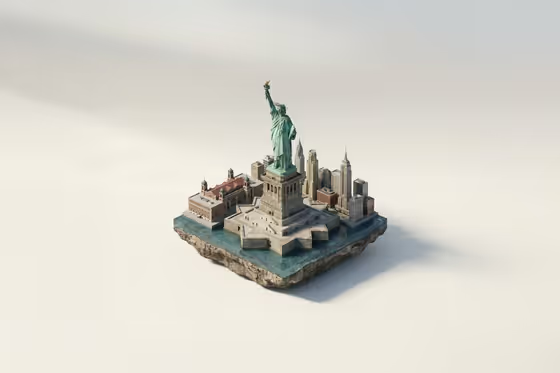
Floating Landmark Miniature turns a real-world landmark into a small isometric diorama that appears to hover on a compact slab of ground. The cover shows the idea: a recognizable monument at the center, a few neighboring city blocks around it, and a rough rock-like underside, all sitting against a soft off-white studio background.
It suits travelers who want a keepsake-style image of a place they love, designers who need a clean architectural model look, and anyone building a set of matching landmark visuals. Each result is a single 16:9 image, with no people and no text in the scene.
What works best as input
- For Landmark subject name, type the landmark's actual name, such as Eiffel Tower or Taj Mahal. A specific, well-known name helps the model keep the real structure and proportions.
- This template asks for 2 or more photos, so pick clear, well-lit shots of the landmark from different angles. Photos with the whole structure visible and little clutter in front work best.
- For City or country context, name the surroundings you want on the base, like a riverfront, harbor edge, or garden and stonework. You can also use a photo here to show the streetscape you have in mind.
- For Miniature landscape, keep the description short and modest, for example a small plaza with trees or a waterfront promenade. Small supporting details leave the landmark as the clear focus.
How to use it
- Open the Floating Landmark Miniature template in Phosphene.
- Type the landmark's name into Landmark subject name, and add your 2 or more reference photos where the template accepts them.
- Fill in City or country context and Miniature landscape with short descriptions (or photos) of the surroundings you want on the floating base.
- Generate the image, then check that the landmark's silhouette and proportions look right and the base stays small and uncluttered. Adjust your wording and run it again if needed.
Tips for a better result
- Use the example phrasing as a model. A short phrase like Parisian riverfront blocks or formal garden geometry gives the base a clear character.
- Try a lesser-known place by entering a local landmark and uploading good reference photos, so the model has real structure to follow.
- Keep the landscape elements few. The template is built so the central structure stays dominant, and a long list of extras works against that.
- Run the same landmark with different context and landscape wording to compare variations, such as a waterfront base versus a garden base.
Common mistakes
- Describing a very crowded base with many buildings, trees, and features, which pulls attention away from the landmark.
- Using blurry, heavily cropped, or single-angle photos, which makes it harder to keep the landmark's true proportions.
- Writing a vague or generic name in Landmark subject name instead of the specific landmark, which can lead to a less recognizable result.
FAQ
Do I need to upload photos?
This template is set up for 2 or more photos, plus a typed landmark name. Clear reference photos help the model keep the structure accurate.
What kind of image will I get?
A single 16:9 image of an isometric diorama with the landmark on a small floating base against an off-white studio background, with no people and no text.
Can I use a landmark that is not famous?
You can enter a local landmark in the name field. Adding clear photos of it from a couple of angles gives the template more to work from.
How do I change what the base looks like?
Edit City or country context for the surrounding blocks and Miniature landscape for supporting elements like plazas, trees, or promenades, then generate again.