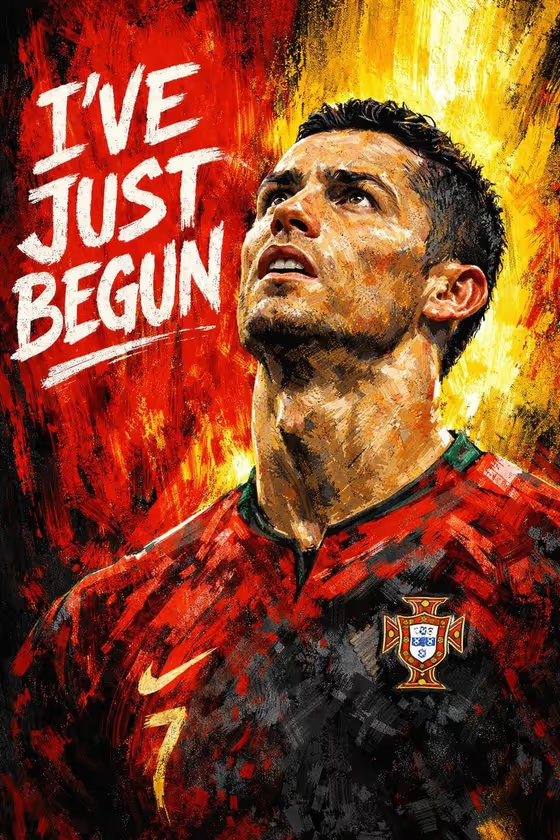
Football Motivation Poster turns a portrait into a bold, textured painting in a black, white, red and yellow palette. The background is split with vertical red and yellow paint streaks, the subject looks upward with a determined expression, and a large hand-lettered white headline sits beside the face.
It suits fans, players, coaches and club or school groups who want a motivational wall poster or social graphic with their own words on it. You choose who is pictured, how the scene is framed, and the exact headline that gets painted in.
The result is a 3:4 image, a good fit for a portrait-format poster or story-style post.
What works best as input
- Use the first field (determined footballer portrait subject) to upload one clear reference photo of the person, or describe the subject in text if you prefer.
- Pick a photo where the face is well lit and fully visible. The poster works best when the head is turned or can be turned slightly upward, so a shot with some upward gaze or a raised chin gives the painting a head start.
- Avoid heavy filters, sunglasses or hats that hide the eyes, since the gaze is the emotional center of the poster.
- Only use photos of yourself or people who have agreed to appear. Do not use a real public figure's likeness without permission.
- If you describe instead of upload, keep it short and concrete, like the placeholder 'a determined footballer'.
How to use it
- Open the Football Motivation Poster template in Phosphene.
- In the portrait subject field, upload your photo or describe the subject, then choose an option in Pose and scene, such as an intimate close portrait or a full-body editorial frame.
- Type your words in Motivational headline, for example 'I've Just Begun' or 'Rise Again'.
- Generate the poster, then review the face, the lettering and the paint texture, and run it again if something is off.
Tips for a better result
- Keep the headline short. Two to four words fit the large hand-painted lettering best and stay easy to read.
- Try the different Pose and scene options. A close portrait emphasizes the upward gaze, while wider frames show more of the shirt and paint texture.
- Test several headlines from the examples, like 'No Finish Line' or 'Built For The Moment', to see which one balances best against the face.
- If a result misses the likeness, try a sharper, better-lit reference photo and generate again.
Common mistakes
- Writing a long sentence as the headline, which crowds the composition and can make the lettering harder to read.
- Uploading a dark, blurry or heavily cropped photo, so the face loses detail once it is turned into paint strokes.
- Expecting a different color scheme. The red, yellow, black and white palette is fixed for this template.
FAQ
Do I have to upload a photo?
The subject field accepts either an uploaded photo or a text description, so you can use whichever suits you. A photo is the way to get a specific person's likeness.
Can I change the colors?
No. The template keeps the red and yellow paint streaks with a black and white palette as its defining look. You control the subject, scene framing and headline.
What can I write in the headline?
Any short motivational phrase. The template renders the exact words you enter, with examples like 'I've Just Begun' and 'Rise Again'.
What shape is the finished poster?
It is a 3:4 portrait image, suited to posters and vertical posts.