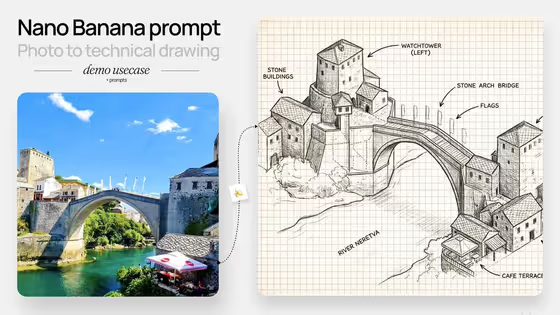
This template turns a place or landmark into a hand-drawn isometric schematic, the kind of sketched diagram you might see on graph paper with small labels pointing at buildings and features. The cover shows a photo of a stone arch bridge over a river becoming a pen-style isometric drawing with callouts for the watchtower, bridge, flags and cafe terrace.
It suits travelers, designers, teachers and anyone who wants a keepsake or presentation visual of a street, landmark or neighborhood. You describe the scene subject or object (or start from a photo of it) and pick a creative direction to set the overall mood of the drawing.
What works best as input
- The Scene subject or object field accepts a photo as well as text, so a clear shot of the place you want drawn is a good starting point.
- Pick a photo where the main structures are easy to see and not blocked by people, cars or heavy shadow. The cover example works because the bridge, towers and buildings are all clearly visible.
- If you type instead, be specific about the place. 'A famous city landmark' is the placeholder, but naming the actual landmark or describing a lively neighborhood scene gives the drawing more to work with.
- Include the features you want labeled or drawn in, such as a river, a tower or a cafe terrace, since the cover result shows callouts for exactly those kinds of elements.
How to use it
- Open the Hand Drawn Isometric Schematic template in Phosphene.
- In Scene subject or object, upload a photo of your place or describe it in words.
- Choose a Creative direction, such as Clean editorial, Cinematic dramatic, Playful colorful or Quiet premium, or describe your own.
- Generate the image, then review the 3:4 result and adjust your inputs if you want a different look.
Tips for a better result
- Try the same scene with different creative directions. Clean editorial and Quiet premium should feel calmer than Playful colorful, so you can compare moods quickly.
- Choose a scene with several distinct structures. Isometric schematics read best when there are buildings, bridges or landmarks to arrange and label.
- If a result misses a detail you care about, add it to your scene description, for example naming the river or a specific building.
- Use a personally meaningful place, like your own street or a favorite destination, to make a one-of-a-kind illustrated map-style piece.
Common mistakes
- Using a cluttered or very dark photo, which makes it harder for the drawing to pick out the main buildings and shapes.
- Writing a vague subject like 'a place' instead of naming the landmark or describing the scene, which leaves the diagram without a clear focus.
- Expecting exact, readable text in every label. Treat the callouts as part of the sketch style and check the result before using it somewhere that needs precise wording.
FAQ
Do I have to upload a photo?
No. The Scene subject or object field accepts a photo, but you can also describe the place in text.
What does the creative direction change?
It sets the overall feel of the drawing. The listed options are Clean editorial, Cinematic dramatic, Playful colorful and Quiet premium.
What kind of image will I get?
A 3:4 image styled as a hand-drawn isometric schematic of the street or place you named, similar to the sketched diagram style in the cover example.
Can I use it for something other than a street or landmark?
The template is built around scenes such as landmarks, neighborhoods, cultural destinations and meaningful places, so those will fit best.