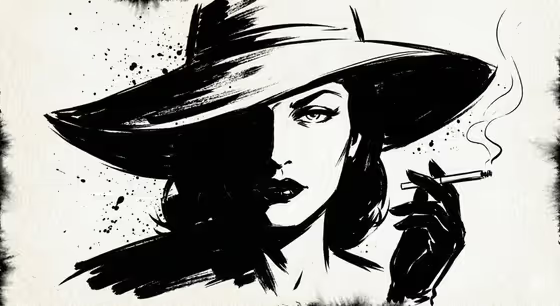
Ink Noir Character turns a portrait subject into a hand-inked noir illustration. Faces and gestures emerge from expressive black ink, with selective bare paper left as highlights, as in the cover: a wide-brimmed hat throwing a deep shadow across half the face, a gloved hand, and a trail of smoke against textured off-white paper.
It suits anyone who wants a moody, mostly-shadow character portrait for a poster, a book or zine cover, a profile image, or a creative project. You describe a subject in words or add a reference, pick an ink style, and the template handles the paper grain, the splatter and the dominant shadows.
What works best as input
- In the Portrait subject field you can describe your subject in text or add a reference photo. A clear, well-lit reference with a visible face and a readable pose gives the ink a strong shape to work from.
- Choose a reference with a distinct silhouette, such as a hat, a raised hand or a turned head. Noir ink depends on bold shapes, and the cover's hat and gloved hand show how much a single strong shape carries.
- Use a respectful, ordinary photo of someone who is happy to be illustrated, and avoid cluttered backgrounds that compete with the face.
- If you type instead, write a short character description in the style of the examples, such as a solitary detective, a fearless musician or a mysterious traveler. A role plus a mood is usually enough.
How to use it
- Open the Ink Noir Character template in Phosphene.
- In Portrait subject, describe your character or add a reference photo (the template's upload requirement is one image).
- In Ink energy, choose a style such as Bold controlled splatter, Dry expressive brushwork, Dense shadow hatching or A refined editorial variation.
- Generate the image, then review the face, the shadow balance and the splatter. Adjust the subject or ink energy and run it again if you want a different feel.
Tips for a better result
- Try the same subject with each Ink energy option. Dry expressive brushwork and Dense shadow hatching should read quite differently from Bold controlled splatter.
- Add one detail that suits noir, like a hat brim, a glove or a wisp of smoke, to give the portrait a gesture to build around.
- Keep the subject text short and focused. The template already supplies the paper grain, heavy shadow and restrained splatter, so you do not need to describe them.
- Expect the output to be mostly shadow with small areas of highlight, and choose subjects that look good that way.
Common mistakes
- Using a busy or low-contrast reference photo, which gives the ink little clear structure to follow.
- Overloading the subject field with many characters, props and settings, which dilutes the single-portrait focus.
- Asking for bright colors or a light, airy look. This template is built around black ink, textured paper and dominant shadow.
FAQ
Do I have to upload a photo?
No. The Portrait subject field accepts a text description or a reference photo, so you can type something like a solitary detective instead.
What does Ink energy change?
It sets the character of the ink work. The options include Bold controlled splatter, Dry expressive brushwork, Dense shadow hatching and A refined editorial variation.
Will the result be in color?
The template is designed around black ink on textured paper with selective negative-space highlights, so expect a monochrome look like the cover.
What shape will the image be?
The template is set to a 3:4 aspect ratio, which suits portraits.