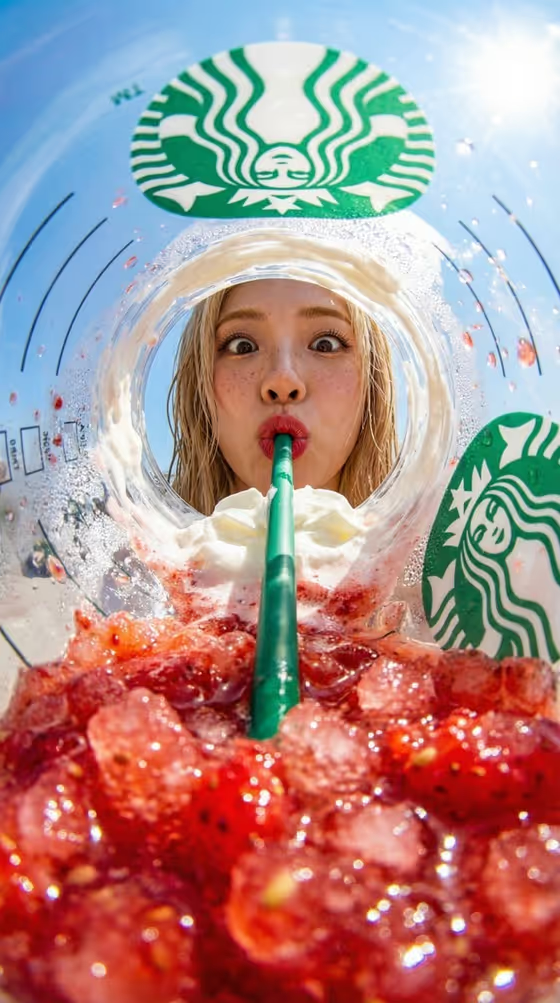
This template builds a macro, fisheye-style commercial image shot from inside a drink cup, looking up through crushed ice and whipped cream at a person sipping through a single straw. The cover shows the idea: a bright summer sky, curved cup walls, red fruit ice in the foreground and a wide-eyed face framed by the cup rim.
It is aimed at marketing and social content for drink brands, creators and cafe owners who want a playful, product-first portrait. The output is a vertical 9:16 image, and the cup is labeled with the brand and drink names you type in.
What works best as input
- For Male Portrait Subject, add a clear, front-facing photo of the person, or describe them in words. The template keeps the subject male and front-facing, so pick a reference where the face is well lit and not cropped.
- Use a close, evenly lit face shot with no sunglasses or heavy shadows, since the final image shows the face looking down into the cup with a wide-eyed expression.
- For First Visual (Drink Product), either upload a photo of the real cup and drink or describe it, for example a strawberry frappuccino with crushed ice. Be specific about toppings like whipped cream or fruit pieces.
- For Second Visual (Straw), describe one continuous straw (color and material, such as green, clear glass, striped paper or stainless steel) or add a reference photo of it.
- Type the actual cup brand in Product One Name and the actual drink name in Product Two Name. These two fields are text only, so spell them exactly as they should appear on the cup.
How to use it
- Open the Inside-the-Cup Summer Portrait template in Phosphene.
- Fill in Male Portrait Subject, First Visual (Drink Product) and Second Visual (Straw). Each accepts a description or a photo, and the template asks for 2 or more photos in total.
- Type the brand in Product One Name and the drink in Product Two Name, then generate the image.
- Review the result for the subject's likeness, a single unbroken straw, and readable cup branding. Adjust your inputs and generate again if something is off.
Tips for a better result
- Pick the drink and straw colors to contrast. The cover pairs a red strawberry drink with a green straw and green branding, and the template's direction leans on complementary red and green.
- Use the example phrasings as starting points, such as an iced matcha latte with cream or a mango slush with fruit ice, to change the whole color mood of the shot.
- Try different expressions in the subject field, like excited, cheerful with a surprised look, or playfully sipping, to change the personality of the portrait.
- Keep the drink description focused on texture words like crushed ice, whipped cream and fruit pieces, since the image is a macro view of those details.
Common mistakes
- Describing more than one straw or a broken, bent straw. The template calls for one continuous straw connecting the ice to the subject's lips.
- Entering a campaign slogan or invented product name in Product Two Name. It should be the actual drink name.
- Using a low-quality or off-angle photo of the person, which makes it harder to preserve their identity in the final image.
FAQ
Can I use a female subject?
This template is written for a male subject. The slot is labeled Male Portrait Subject and the prompt keeps the person male.
Do I have to upload photos?
The template asks for 2 or more photos, and the subject, drink and straw slots each accept either a photo or a text description.
What shape is the output?
It produces a single vertical image in 9:16.
Where does the branding come from?
From the two text fields, Product One Name for the cup brand and Product Two Name for the drink name. Type them exactly as you want them labeled.