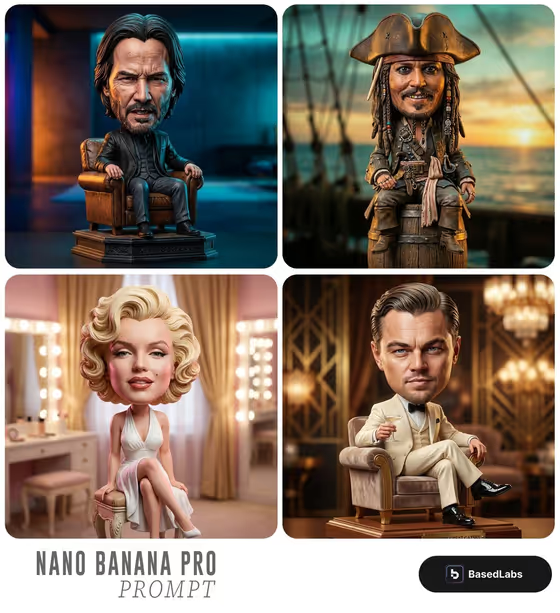
This template turns a character idea or a reference photo into a collectible bobblehead figurine with an oversized head, carefully sculpted detail and an intense, expressive face. The figurine sits in a vintage armchair and is shot like a premium toy product, with dramatic colored studio lighting and a shallow depth of field.
It suits anyone who wants a stylized collectible portrait: gift ideas, character concepts, profile images or fun caricature art. You choose who the figure is, what it wears and what colors fill the studio backdrop, and the template handles the sculpted-toy look and photography.
What works best as input
- The Hero Product Character field accepts either a short text description or a visual reference. The template asks for 2 or more photos, so give it a few clear shots of the same subject.
- Use well-lit photos where the face is fully visible and not hidden by sunglasses, hats or heavy shadows. Varied angles, such as one front-on and one slightly turned, give the caricature more to work from.
- If you describe instead of upload, be specific about personality and age, like the examples 'veteran rock musician' or 'weathered sea captain'. A vivid character type gives the face more attitude.
- Character Outfit also accepts a photo, so you can upload a clothing reference or type something like 'tailored velvet suit' or 'vintage racing overalls'.
- Only upload photos of yourself or people who have agreed to it, and keep the subject respectful. The Studio Backdrop field takes text only, so describe its colors in words.
How to use it
- Open the Intense Bobblehead Portrait template in Phosphene.
- Fill in Hero Product Character with a description or reference photos, then set Character Outfit with text or a photo reference.
- Type your colors into Studio Backdrop, for example 'gold and deep teal' or 'violet and amber'.
- Generate the image, then review the 3:4 result for the face likeness, outfit details and backdrop colors. Adjust a field and run it again if something is off.
Tips for a better result
- Pair a strong character type with a matching outfit, such as 'weathered sea captain' with 'ornate naval coat', so the whole figurine tells one story.
- Use two contrasting colors for the backdrop, like 'electric blue and crimson' or 'emerald and scarlet', to get the dramatic colored lighting the template is built around.
- Be concrete about clothing materials and condition, like 'distressed leather jacket' or 'tailored velvet suit', since the template emphasizes realistic textures.
- Keep the same subject and change only the outfit or backdrop between runs to compare variations side by side.
Common mistakes
- Uploading only one photo or blurry, dark images. The template expects 2 or more clear references, and weak photos make the caricature face less convincing.
- Writing a vague character such as 'a person' or 'cool guy'. Without personality or a profession, the expression and styling come out generic.
- Putting scene instructions in the wrong place, like asking for a different pose or chair. The seated vintage armchair pose is fixed, so use the three fields for character, outfit and backdrop colors.
FAQ
Can I use a photo instead of typing a description?
Yes for the character and the outfit, since both fields accept a photo reference. The Studio Backdrop field is text only, so describe its colors in words.
Can I change the armchair or the pose?
No. The oversized head, intense expression and seated vintage armchair pose are part of the template's fixed direction. You customize the character, outfit and backdrop colors.
What shape is the final image?
The output is a still image in a 3:4 portrait aspect ratio.
What should I put in Studio Backdrop?
Name a color pairing, like 'violet and amber' or 'gold and deep teal'. The examples in the field show the style that works well with the dramatic studio lighting.