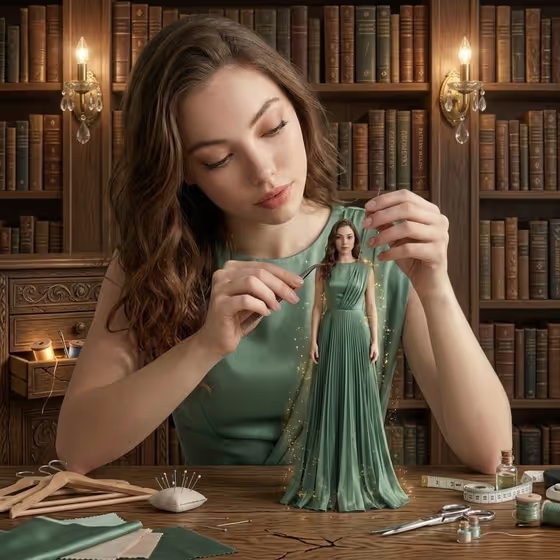
Miniature Self Sculptor creates a whimsical 3:4 portrait in a vintage library. A woman sits at a wooden desk and carefully adjusts a tiny sculpted version of herself standing on the table, dressed in a flowing green gown with faint glowing particles around it.
It suits anyone who wants a playful, storybook-style portrait of themselves: a profile picture, a creative gift, or a themed image for a craft or design project. The scene is built around a giant-versus-miniature idea, so the result reads as a person making a small copy of herself.
What works best as input
- Use a clear photo of one adult with the face fully visible and evenly lit. The 'Portrait subject' field accepts a photo, and the template is set up for a single upload.
- Pick a photo where the pose is close to what you want. The default for 'Pose or expression' is the source seated pose, so a seated or upper-body shot gives the model a natural starting point.
- If you describe instead of upload, write something specific in 'Portrait subject', such as 'an adult woman with a distinctive presence' or 'an expressive adult creative'.
- Avoid photos with heavy filters, sunglasses, or other people in frame, since the scene needs one clear person to repeat at two sizes.
How to use it
- Open the Miniature Self Sculptor template in Phosphene.
- In 'Portrait subject', add your photo or describe the subject. The placeholder suggests 'an adult woman matching my reference' if you are working from an upload.
- In 'Pose or expression', choose or type how the larger figure should sit, for example 'relaxed seated posture' or 'upright composed pose'.
- Generate the image, then review it. Check that the miniature and the larger figure feel like the same person and that the scale looks believable on the desk.
Tips for a better result
- Try different options in 'Pose or expression', such as 'candid mid-action posture', to change how the larger figure handles the tiny one.
- Pick a source photo with a calm, focused expression. The scene is meant to feel gentle and absorbed, as if the person is crafting something delicate.
- If the first result misses on likeness, try a different photo with clearer lighting and a more direct angle rather than changing everything at once.
- Generate a few versions and compare them. Small differences in hands, the miniature's dress folds, and the desk props can make one result stand out.
Common mistakes
- Uploading a small, blurry, or heavily shadowed photo. The face gets repeated at two scales, so weak source detail shows quickly.
- Writing a vague subject like 'a person'. Be specific about who or what the subject should be so the result stays consistent.
- Choosing a pose that conflicts with the scene, such as a standing full-body pose, when the idea is someone seated at a desk working on a tiny figure.
FAQ
Do I have to upload a photo?
The 'Portrait subject' field accepts a photo, and the template lists an upload of one image. You can also describe the subject in text, using the examples in the field as a guide.
What does the finished image look like?
It is a 3:4 image of a person seated at a wooden desk in a vintage library, adjusting a tiny version of herself in a green dress, with sewing tools on the desk and warm lamp light.
Can I change the pose?
Yes. The 'Pose or expression' field takes your own wording, with examples like 'relaxed seated posture' or 'upright composed pose'.
Is this only for women?
The scene is written around a woman, but the 'Portrait subject' examples also include an adult man with a distinctive presence, so you can describe a different subject.