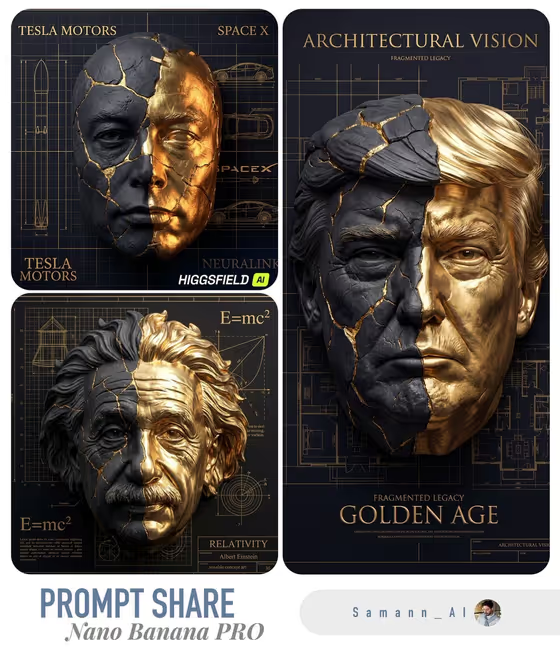
This template turns a portrait into a fractured sculptural mask, split between cracked matte charcoal stone and polished gold leaf, with fine Kintsugi-style seams where the two materials meet. The mask sits on a dark technical background covered in gold blueprint lines, and the result comes out as a 3:4 image.
It suits people who want a dramatic, poster-like piece from a single portrait: a profile image with a strong visual identity, a title-card style artwork, or a themed series where each portrait gets a different blueprint motif. You control who the portrait shows, how much of the mask is stone versus gold, and what kind of drawings fill the background.
What works best as input
- Upload one clear portrait of the person you want in the mask. The template is built to preserve facial geometry, so a sharp, evenly lit face gives the fracture pattern something accurate to follow.
- Pick a front-facing or near front-facing shot with the whole face visible. Hair, glasses or hands covering the face can make the sculpted mask harder to read.
- Only use photos of people who are you or who have agreed to it, and keep the portrait respectful. Avoid using other people's likeness without their consent.
- If you would rather not upload, you can type a description in the Portrait subject field instead, such as 'a refined older man' or 'an expressive young woman'.
- Keep the Blueprint motif short and concrete, for example 'architectural grids and elevations' or 'constellation geometry', so the background drawings stay coherent.
How to use it
- Open the Kintsugi Split Portrait Mask template in Phosphene.
- In Portrait subject, upload your portrait or type a short description of the person. In Stone-to-gold balance, choose how the mask should split, such as 'mostly charcoal stone' or 'gold concentrated along fractures'.
- In Blueprint motif, pick one of the suggestions or write your own, such as 'mechanical diagrams and measurements', then generate the image.
- Review the result for likeness, crack placement and background. If something is off, adjust one field at a time and generate again.
Tips for a better result
- Try each balance option on the same portrait. 'Mostly charcoal stone' feels dark and weathered, while 'mostly radiant gold' reads brighter and more ornate.
- Match the blueprint motif to the person or theme: mechanical diagrams for an engineer, constellation geometry for a dreamy look, or ornamental serif title studies for a more editorial poster feel.
- Use 'gold concentrated along fractures' when you want the Kintsugi idea front and center, with the cracks glowing against darker stone.
- Keep the background request to one motif. A single clear theme tends to give cleaner linework than a long list of ideas.
Common mistakes
- Uploading a small, blurry or heavily shadowed photo, which gives the mask less facial detail to preserve.
- Packing several unrelated ideas into Blueprint motif, which can make the background busy and compete with the mask.
- Expecting a different aspect ratio or a video. This template produces a 3:4 still image.
FAQ
Do I have to upload a photo?
No. The Portrait subject field accepts either an uploaded reference or a typed description, though an upload helps the mask follow a specific face.
What does the Stone-to-gold balance control?
It sets how much of the mask is cracked charcoal stone versus polished gold leaf, from mostly stone to mostly gold, or gold only along the fracture lines.
Can I choose what the background looks like?
Yes. Blueprint motif sets the technical drawings behind the mask, such as architectural grids, mechanical diagrams, constellation geometry or serif title studies.
What kind of output will I get?
A single 3:4 image of a fractured stone-and-gold mask over gold blueprint lines on a dark background.