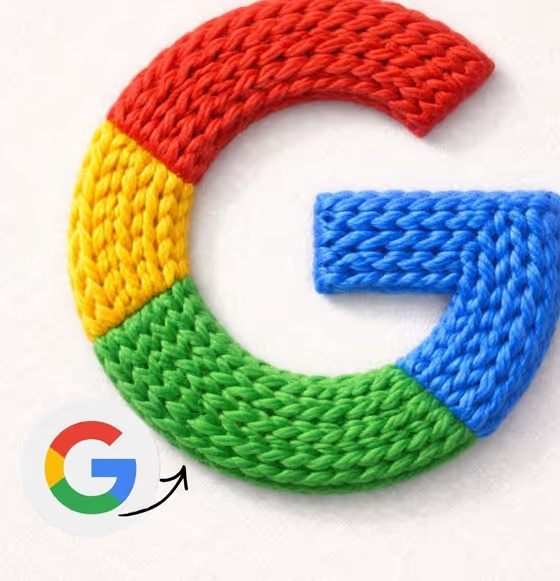
Knitted Logo Object turns a logo or brand mark into a macro product photo where the whole shape is built from thick, hand-knitted yarn. You see loops, stitch rows and fuzzy fibers, and the object sits centered on a clean, light studio background in a square 1:1 frame.
It suits designers, small brands, app makers and anyone who wants a tactile, craft-style version of a mark for a profile image, a post or a mood board. The cover image shows the idea: a multicolor letter mark rendered in chunky stitched wool, with the original flat logo shown beside it for comparison.
What works best as input
- For the Logo product or brand mark field you can type a description or upload a matching reference. A clean, flat logo image on a plain background gives the model the clearest shape to rebuild.
- If you describe instead of uploading, be concrete about the shape and symbol, like the template examples 'rounded camera app logo' or 'play-button app icon'.
- Choose a reference where the outline and inner symbol are sharp and uncluttered. Heavy gradients, tiny details or busy backgrounds are harder to translate into thick yarn.
- Keep it to one mark. The template builds a single centered object, so a lone logo works better than a sheet of several marks.
How to use it
- Open the Knitted Logo Object template in Phosphene.
- In Logo product or brand mark, upload your logo or type a short description of it, such as 'music-note brand mark'.
- Fill in Yarn gradient palette with the colors you want, for example 'blue, teal and violet', or write 'my brand yarn colors' to aim for your own palette.
- Generate the image, then check that the outline and inner symbol still read as your logo and that the stitches look convincing.
Tips for a better result
- Name two or three colors in the palette field, in the order you want them to flow, to guide the gradient across the yarn.
- If you want the result to match a brand, upload the logo as your reference and use 'my brand yarn colors' so the yarn follows it.
- Simple, bold marks with a strong silhouette tend to stay recognizable when knitted. Try a simplified version of a detailed logo.
- Generate a few times with different palettes, such as warm pink and orange versus cool blue and violet, and compare which suits the mark.
Common mistakes
- Uploading a low-contrast or cluttered logo, which can make the knitted shape lose its proportions.
- Leaving the palette vague, like 'colorful', instead of naming specific colors you want in the yarn.
- Expecting text or small lettering to stay crisp. The template adds no extra text, and thick yarn favors bold shapes over fine detail.
FAQ
Can I upload my own logo?
Yes. The Logo product or brand mark field accepts a matching reference photo, or you can describe the logo in text instead.
What does the output look like?
A square 1:1 macro product photo of your logo made from knitted yarn, centered on a clean studio background with soft light.
Can I choose the yarn colors?
Yes. The Yarn gradient palette field takes the colors you want, such as 'red, coral and yellow', or you can ask for your brand's yarn colors.
Will my logo stay recognizable?
The template is set up to preserve the logo's proportions and inner symbol, but results vary, so review the image and try again with a cleaner reference if needed.