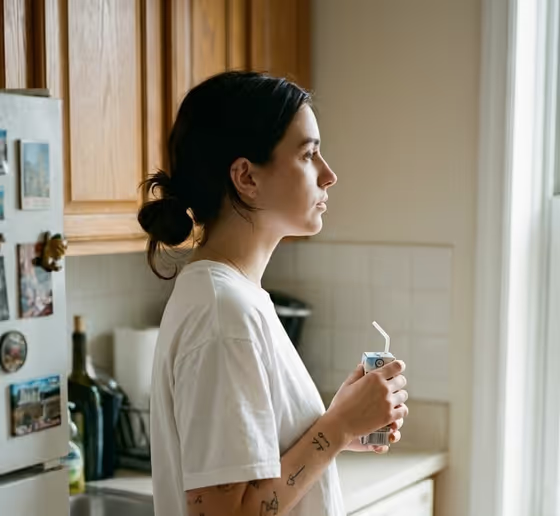
Kitchen Carton Pause makes a candid, documentary-style portrait of one adult standing in side profile in a lived-in kitchen, holding a small drink carton. The scene follows the cover: wooden cabinets, a fridge covered in souvenir magnets, soft window light and a light film-grain look. The output is a 3:4 image.
It suits anyone who wants a quiet, everyday portrait with a real-home feel, such as a personal profile picture, a lifestyle post, or a mood piece about a calm moment at home. You describe the person and drink, pick a pose or moment, and the template handles the kitchen styling and lighting.
What works best as input
- The Person and Drink Product field accepts a photo reference as well as a description, so you can upload one clear photo of the person you want to appear. Choose a photo with good light and a visible face and hair, since the template aims to keep loose hair and details like subtle tattoos if present.
- Use a photo of yourself or someone who has agreed to be pictured. Avoid images of other people's faces taken without their consent.
- Say what the drink is in the same field. The examples use wording like 'a small drink carton', 'an oat-milk carton' or 'a juice box', and the carton is meant to be held naturally.
- For the Domestic Moment field, type a short, specific pose or beat, such as 'side profile with one hand on hip' or 'quiet sip beside the counter'. This field is text only, so do not try to attach a photo there.
- If you skip the photo and write a description instead, keep it simple and adult: for example 'a relaxed man with an oat-milk carton' or 'a thoughtful home cook with a beverage'.
How to use it
- Open the Kitchen Carton Pause template in Phosphene.
- In Person and Drink Product, upload your reference photo or type a short description of the person and the carton they are holding.
- In Domestic Moment, type the pose or action you want, such as 'still gaze near the refrigerator' or 'casual pause in window light'.
- Generate the image, then check the 3:4 result for the profile pose, the carton in hand, the kitchen details and the window light. Adjust your wording and run it again if something is off.
Tips for a better result
- Keep the Domestic Moment to one clear idea. The scene is built around a calm, neutral expression and relaxed posture, so a simple pause reads better than a busy action.
- Try the example moments as a set, such as the quiet sip beside the counter and the still gaze near the refrigerator, to get a small series of related portraits.
- Name the drink type in the first field. Switching between an oat-milk carton, a juice box or a generic beverage changes what the person holds while the kitchen stays the same.
- If a detail like hair or a tattoo matters to you, use a reference photo where it is clearly visible and mention it in your description.
Common mistakes
- Writing a long, multi-part scene in Domestic Moment. The kitchen setting is already fixed by the template, so describing a different room or several actions can fight the intended look.
- Using a blurry, dark or heavily cropped photo as the reference, which gives the template little to preserve.
- Describing more than one person. The template is built around one adult in profile, so extra subjects can lead to duplicates or a cluttered result.
FAQ
Do I have to upload a photo?
No. The Person and Drink Product field accepts either a photo reference or a typed description, such as 'an adult woman holding a small drink carton'. The Domestic Moment field is text only.
Can I change the kitchen?
The kitchen is part of the template's fixed direction: wooden cabinets, fridge magnets and warm window light. You steer the pose and the person, not the room.
What shape is the image?
The output is a 3:4 image, a portrait orientation.
Can the drink be something other than a carton?
The template is designed around a small drink carton, and the examples include an oat-milk carton and a juice box. You can describe the drink in the first field, but results are best when it stays a small hand-held beverage.