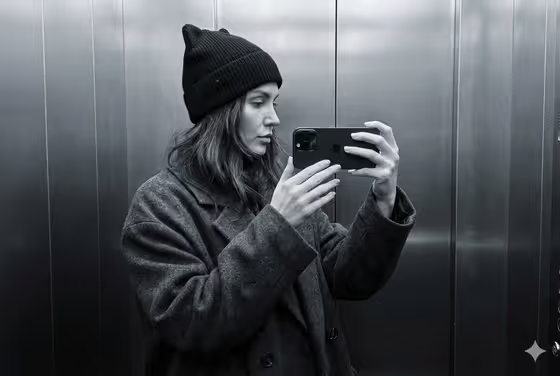
This template builds a grayscale mirror selfie set inside a metal elevator. The subject wears a dark oversized coat and a black knit hat with cat ears, holds a black smartphone up to the mirror, and stands against brushed steel panels in soft, diffused light.
It suits anyone who wants a moody, minimalist portrait with a candid street-style feel. You give it a subject (a photo or a short description) and pick how the scene is framed, and the fixed styling keeps the black, graphite and steel-gray look consistent.
What works best as input
- Use a clear photo of the person you want in the shot, with the face and hair easy to see. The template can take an upload in the first field.
- Pick a photo where the face is evenly lit and not hidden by sunglasses, a hand or heavy shadow, so the likeness carries over cleanly.
- If you would rather describe the subject, type something short in the first field, such as the placeholder example "a woman taking a mirror selfie".
- Only use photos of yourself or people who have agreed to it, and keep the description respectful and plain.
How to use it
- Open the Monochrome Elevator Selfie template in Phosphene.
- In the first field (woman taking a mirror selfie portrait subject), upload your photo or type a short description of the subject.
- In Pose and scene, choose how you want the shot framed, for example an intimate close portrait, a full-body editorial frame or an environmental candid frame.
- Generate the image, then check the face, hands, phone and background. Adjust your inputs and run it again if you want a different result.
Tips for a better result
- Try each Pose and scene option with the same subject. A close portrait puts more weight on the face and hat, while a full-body frame shows more of the coat.
- If your first photo gives a weak likeness, swap in a sharper, more front-facing one and compare the two results.
- Keep the subject text short and concrete. The wardrobe, mirror, elevator and lighting are already fixed by the template, so extra detail there adds little.
- Look closely at the phone and hands in the result, since the template aims for shallow depth of field there, and regenerate if they look off.
Common mistakes
- Uploading a small, blurry or heavily filtered photo, which gives the template little to work with for the face and hair.
- Writing a long description of outfits, colors or locations in the subject field. Those are already set, and the template is built around a monochrome look.
- Expecting a color image. The output is meant to be grayscale with cool steel tones.
FAQ
Can I use my own photo?
Yes. The first field accepts an uploaded photo or a short text description of the subject.
Will the result be in color?
No. The template is styled as a monochrome shot in black, graphite and gray steel tones.
What image shape does it produce?
It creates a single image with a 3:2 aspect ratio.
Can I change the hat or coat?
The oversized coat and cat-ear knit hat are part of the template's fixed styling. You control the subject and the Pose and scene choice.