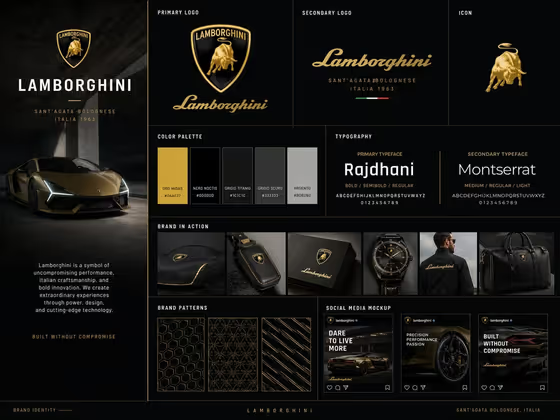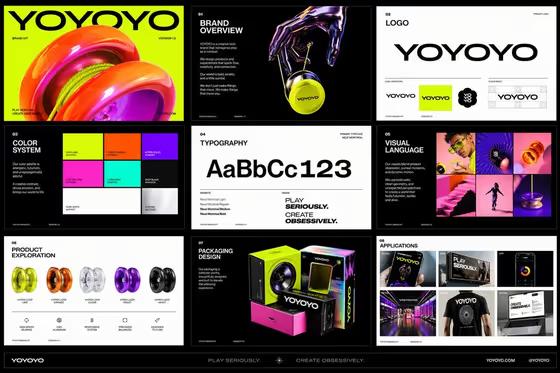
This template builds a multi-page brand kit for a toy-inspired product, delivered as a coordinated set of images rather than one crowded board. The cover shows what to expect: a title page, brand overview, logo, color system, typography, visual language, product exploration, packaging, and applications, all sharing the same bold geometry and vibrant look.
It suits founders, designers, and students who want to see how a playful brand could hold together across product, packaging, retail, and digital surfaces. You do not upload anything. You describe the brand in four fields and the template handles the art direction.
What works best as input
- This template has no photo slot, so everything comes from what you type. Short, specific entries give the clearest direction.
- For Brand name, use the actual name as you want it printed, in the style of YOYOYO, LOOP LAB, or KINETIC CLUB. Capitals are what the examples use, and the name will be repeated across the logo and applications.
- For Flagship product world, pick the option that matches what your brand sells, such as a toy-inspired creative device or a tactile music gadget. This choice anchors the product imagery and packaging.
- For Signature palette, name two or three colors with clear descriptors, like electric blue, coral, and lemon. Fewer, well-chosen colors keep the identity vibrant but controlled.
- For Brand voice, write one short phrase you can imagine on a poster or box, such as PLAY IN MOTION or DESIGNED TO MOVE.
How to use it
- Open the Playful Future Brand Kit template in Phosphene.
- Fill in all four required fields: Brand name, Flagship product world, Signature palette, and Brand voice. Use the placeholders and examples as a model for length and tone.
- Generate the kit and wait for the set of 3:4 images to finish.
- Review the pages for consistency in logo, colors, and type, then adjust a field and regenerate if a page drifts from what you wanted.
Tips for a better result
- Pick a palette with a clear relationship between colors, such as one dominant, one accent, and one light tone. The template is built to repeat the palette across packaging, retail, and digital pages, so a clear hierarchy carries through.
- Keep the brand voice to a few words. A short phrase fits cleanly on signage, boxes, and screens, as seen in the cover's two-line tagline style.
- Try the same brand name with a different product world to see how the packaging and photography change while the identity logic stays recognizable.
- Run a few variations of the palette field, for example violet, mint, and hot orange versus lime, cobalt, and soft pink, and compare which set feels most like your brand.
Common mistakes
- Listing too many colors in Signature palette. Four or five competing hues work against the controlled, cohesive look the template aims for.
- Writing a long sentence in Brand voice. A slogan that runs long is harder to repeat across applications and may come out cramped.
- Choosing a product world that does not match your brand name's personality, which can make the product pages feel disconnected from the identity.
FAQ
Do I need to upload a logo or photo?
No. All four fields are text or a selection, and none accept a photo. You describe the brand and the template creates the identity from your input.
What will the kit include?
The template directs a sequence of images covering the core mark, typography, color and motion language, product details, packaging, editorial photography, retail environment, and digital touchpoints.
Can I use my real company name?
Yes, the Brand name field takes any name you enter. Check the generated spelling and lettering carefully before using any page.
What aspect ratio are the results?
The output is 3:4 images.