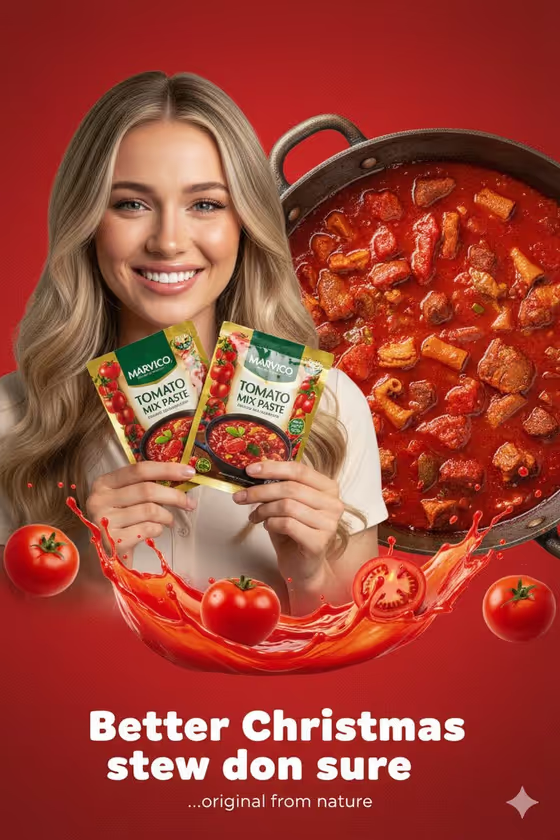
This template builds a vertical 3:4 ad poster around two tilted foil sachets set against a textured red gradient, with a bold bubble-style headline across the bottom. The cover shows a smiling cook holding two seasoning sachets, a pot of rich red stew behind her, and splashes of tomato sauce and whole tomatoes around the frame.
It suits small food brands, sellers of seasonings and sauces, and anyone preparing a seasonal or campaign poster for packaged food. You describe or upload the cook, the product, and the layout, then add your own headline so the poster carries your message.
What works best as input
- For Portrait subject, Featured product or prop and Campaign cook, you can either upload a photo or describe the person or item in text. Clear, well-lit photos where the face or the package fills most of the frame give the template more to work with.
- For the product, a straight-on photo of the sachet or package where the label is sharp and readable works best. Since the poster features two sachets, add more than one product photo if your packaging comes in variants.
- If you describe instead of upload, be specific, like the examples: 'a joyful home cook', 'a confident chef', 'a smiling parent' or 'a street-food vendor' each point to a very different look.
- Rendered name or title and Vertical ad layout are text-only fields. Write the headline in short, punchy words (the examples are 'RICH TOMATO TASTE' and 'COOK WITH COLOR'), and pick a layout phrase such as 'Person above product and stew' or 'Product hero with cook inset'.
How to use it
- Open the template in Phosphene and read the six fields: Portrait subject, Featured product or prop, Rendered name or title, Campaign cook, Vertical ad layout and Ad headline.
- Fill the person and product fields, either by uploading photos where the field accepts them or by typing a short description. Then type your rendered title and your ad headline.
- In Vertical ad layout, choose or write how the poster should be arranged, for example 'Person above product and stew' to match the cover's structure.
- Generate the poster, then check that the sachets, the person and the headline text look right before you save or reuse it.
Tips for a better result
- Keep the headline short. Bold bubble lettering reads best with a few words, so something like 'BOLD FLAVOR FAST' will sit better than a full sentence.
- Try different layout phrases while keeping everything else the same. 'Headline-led retail poster' will give a very different poster from 'Product hero with cook inset'.
- Match the cook to your audience. A 'street-food vendor' and a 'smiling parent' tell different stories even with the same product and headline.
- If you run a seasonal campaign, put the occasion into the headline wording, as the cover does with its Christmas stew message.
Common mistakes
- Using a blurry or heavily cropped product photo. If the label is hard to read in your upload, the sachet in the poster may be harder to read too.
- Writing a long headline. The text is rendered in large lettering, so long phrases can feel crowded or come out with errors.
- Leaving the layout field vague. Without a clear arrangement such as 'Person above product and stew', the poster may not be composed the way you pictured.
FAQ
Do I have to upload photos?
No. The person, product and cook fields accept either a photo or a text description. The headline, title and layout fields are text only.
What shape is the poster?
It is a vertical 3:4 image, like the cover, which suits portrait ad placements and posters.
Can I change the headline wording?
Yes. Type your own text in the Ad headline field and the Rendered name or title field. Short, bold phrases work best.
Is this only for tomato or stew products?
The cover shows a seasoning sachet with a stew, but the product and cook fields are open, so you can describe or upload other packaged products and pair them with a fitting cook.