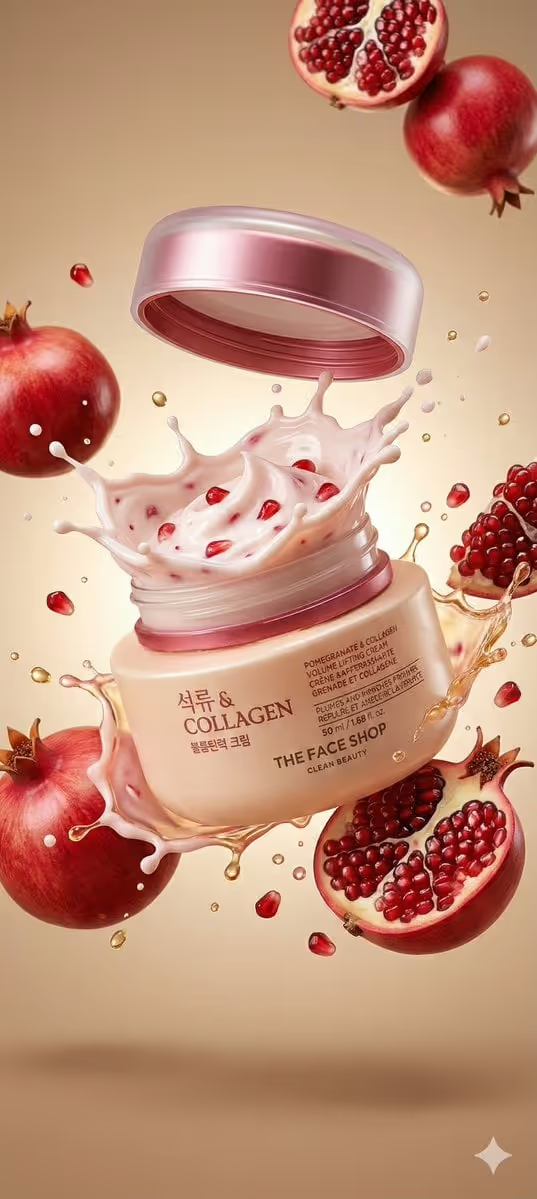
Pomegranate Cream Burst turns a skincare jar into a macro product image where the lid floats above, thick cream splashes upward, and jewel-like fruit hangs in the air around it. The cover shows the idea well: a tilted jar on a warm beige gradient, glossy cream crowns, pomegranate halves, scattered seeds and small gold droplets.
It is made for skincare and beauty sellers, small brands and content creators who want a lively hero image for a cream, mask or moisturizer without setting up a splash shoot. You describe or show your product, choose the fruit and cream mix, and the template builds the burst around it in a 3:4 frame.
What works best as input
- For the Skincare Product field, a photo reference is allowed. Use a sharp, evenly lit shot of the jar with the label facing the camera so the packaging reads clearly.
- Pick a photo where the jar sits alone against a plain background. Extra objects, hands or busy surroundings can confuse what the product should look like.
- If you type instead of uploading, describe the container, color and finish, such as 'a beige collagen cream jar' or 'a rose-gold peptide moisturizer'.
- The Fruit-and-Cream Burst field is text only, so write the fruit and the cream texture together, for example 'raspberries and whipped peptide gel'.
- Match the burst to what the product actually contains or promises, so the fruit and cream color feel like part of the same brand.
How to use it
- Open the Pomegranate Cream Burst template in Phosphene.
- In Skincare Product, upload a clear photo of your jar or type a short description of it.
- In Fruit-and-Cream Burst, enter the fruit and cream pairing you want, or start from one of the example ideas.
- Generate the image, then check the jar shape, label area, lid and splash. If something is off, adjust the wording or swap in a cleaner photo and run it again.
Tips for a better result
- Try the built-in pairings as a starting point, such as rose petals and pearl cream or cherries and glossy hydration serum, then tweak one detail at a time.
- Keep the cream color close to your brand palette. Pale pink cream with ruby fruit suits the warm beige, blush and ruby look the template aims for.
- Use one fruit or flower family per run. A focused pairing usually reads cleaner than a long list of ingredients.
- Generate a few versions with different burst descriptions and pick the one where the label and lid are clearest.
Common mistakes
- Using a dark, cropped or reflective-glare photo of the jar, which makes the packaging hard to reproduce faithfully.
- Packing many fruits and textures into the burst field, which can crowd the scene and bury the product.
- Expecting small label text to come out perfect every time. Check any wording on the jar and regenerate if it looks off.
FAQ
Do I have to upload a photo?
No. The Skincare Product field accepts a photo but also works with a typed description. The Fruit-and-Cream Burst field is text only.
What kind of products does it suit?
Jars of cream, moisturizer, night cream or face mask work best, since the scene is built around a cosmetic jar opening mid-air.
Can I use a fruit other than pomegranate?
Yes. The template title leans on pomegranate, but the burst field accepts other pairings such as raspberries, cherries or rose petals.
What shape does the result come in?
It is made as a 3:4 image, so it suits portrait placements such as product pages and social posts.