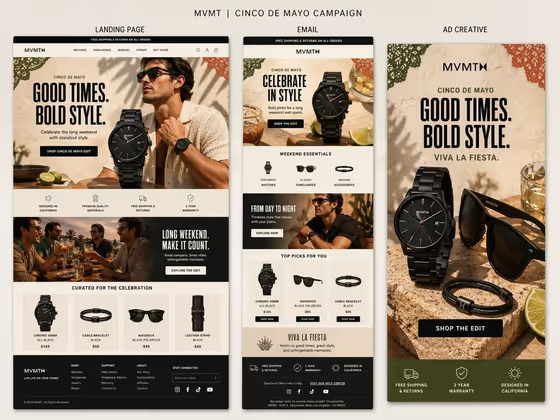
Campaign Presentation Board turns a single product and a short phrase into a creative-review board with three labeled panels side by side: a landing page, an email, and an ad creative. The cover shows how the same headline, palette, and product styling carry across all three formats, so the result reads like one campaign rather than three separate designs.
It suits marketers, designers, and founders who want to preview how a seasonal campaign could look across formats before briefing a team or pitching an idea. The output is a 3:4 image that works well as a concept board for discussion.
What works best as input
- In the Product field you can describe the item in words or add a photo as an exact visual reference. A clear, well-lit photo of the product on a plain background gives the board the most faithful hero item.
- Show the product from a flattering, recognizable angle with the whole object in frame. The cover's black watch, sunglasses, and bracelet read clearly because each has a distinct silhouette.
- If you describe the product instead, be specific about shape, color, and material (for example, an all-black link-bracelet watch) rather than a vague label like 'a watch'.
- For Phrase, enter the exact words you want rendered, kept short and punchy. The cover uses a two-part headline, which fits the large type areas well.
- For Material Finish, name a concrete look such as polished metallic lettering or a bold contemporary variation, since this field shapes how the typography is treated.
How to use it
- Open the Campaign Presentation Board template in Phosphene.
- Fill in Product with a description, a photo, or both, then type your exact wording into Phrase.
- Enter a Material Finish, such as one of the examples offered in the field, to set how the lettering and surfaces look.
- Generate the board, then review the three panels and the labels above them. Check that your phrase is spelled correctly and the product looks right before using or sharing it.
Tips for a better result
- Keep the Phrase short. Shorter headlines are easier to render legibly across all three panels.
- Try several Material Finish options with the same product and phrase to compare how the board's typography and mood shift.
- Use a product photo for the Product field when you need the hero item to match a real design, and a text description when you are exploring ideas.
- Treat the board as a concept preview. Small text such as footers and nav items is meant to feel realistic but may not be fully legible, so zoom in on the main headlines and labels when reviewing.
Common mistakes
- Writing a long or multi-sentence Phrase. The panels have limited room for headlines, so long text can come out cramped or misspelled.
- Using a vague Product description. Without specifics, the hero item may not match what you had in mind.
- Expecting every tiny line of interface text to be readable. Focus on the headline, labels, and calls to action, and verify them before relying on the image.
FAQ
Do I have to upload a photo?
No. The Product field accepts a text description, a photo reference, or both. Phrase and Material Finish are text only.
What does the output look like?
A single 3:4 image with a title at the top and three labeled panels (Landing Page, Email, Ad Creative) that share one visual style.
What should I put in Material Finish?
Describe the look you want for the lettering and surfaces, such as polished metallic lettering, a refined classic variation, or a bold contemporary variation.
Can I check the text before using the board?
Yes, and you should. Review the headline, panel labels, and phrase for spelling and legibility after generating.