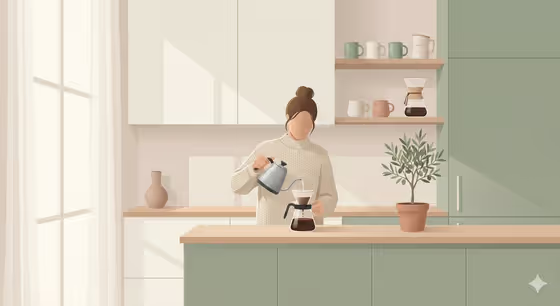
This template turns a subject you choose into a flat Scandinavian-style illustration. Think muted pastels, soft gradients, clean shapes and a cozy, modern lifestyle feel, like the cover image of a person pouring coffee in a calm sage and cream kitchen.
It suits anyone who wants a calm, minimal illustration of an object or everyday scene, for example for a blog header, a poster, a moodboard or a gift idea. The output is a single image in a 3:4 portrait format.
What works best as input
- For the Scene subject or object field, you can upload one photo or describe the subject in words. A photo of a single clear object or scene gives the template a defined starting point.
- Pick a photo where the subject is easy to read, with a simple background and even lighting. The template keeps the source's composition and lighting, so a cluttered photo tends to produce a cluttered illustration.
- If you type instead, be concrete. Something like a handcrafted keepsake or a mechanical device works better than a vague word like stuff.
- Keep it to one main subject. Flat design relies on clean shapes, so fewer elements usually read more clearly.
How to use it
- Open the Scandinavian-Style Minimal Illustration template in Phosphene.
- In Scene subject or object, upload your photo or type a short description of what you want illustrated.
- Set Creative direction, either by picking an option such as Clean editorial or Quiet premium or by describing your own mood.
- Generate the image, then review the composition, palette and overall feel, and adjust your inputs if you want another take.
Tips for a better result
- For the most Scandinavian result, try a creative direction like Quiet premium or Clean editorial, which suit the muted, calm look of the template.
- Try Playful colorful if you want a livelier version, and compare it against a quieter direction using the same subject.
- Choose subjects with a natural lifestyle context, such as a drink being made or an object on a shelf, since the style is built around a cozy, lived-in feel.
- Run the same subject with different creative directions to build a small matching set of illustrations.
Common mistakes
- Using a busy or dark photo. The illustration follows the source's composition and lighting, so a crowded image can lose the clean, minimal look.
- Writing a long list of subjects in one field. The style works best with one clear focus rather than many competing items.
- Choosing a very dramatic direction like Cinematic dramatic and expecting soft pastels. Strong moods can pull against the gentle, cozy aesthetic.
FAQ
Do I have to upload a photo?
No. The Scene subject or object field accepts either a photo or a text description, so you can type what you want instead.
What will the result look like?
A flat-design illustration in muted pastels with soft gradients and a cozy, modern mood, similar to the kitchen scene on the cover.
What shape is the image?
The template outputs a single image in a 3:4 portrait aspect ratio.
Can I use my own creative direction?
Yes. Creative direction lets you choose or describe a mood, so you can use the suggested options or write your own.