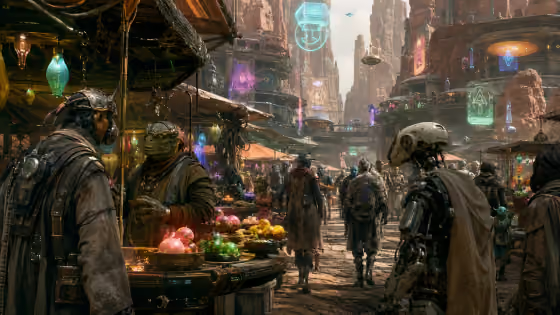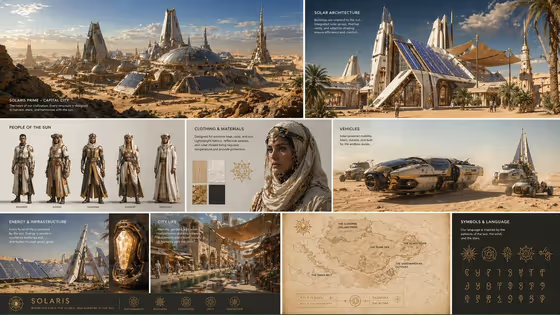
Solar Desert World Bible builds a single multi-panel board that treats an imagined desert civilization as a coordinated world. Instead of one generic picture, you get a set of panels covering settlement architecture, inhabitants, clothing and materials, vehicles, energy infrastructure, city life, a regional map and a symbols and language panel, all sharing one material and shape language. The output is a 3:4 image.
It suits writers, game designers, tabletop game masters, concept artists and anyone pitching or developing a fictional culture who wants a quick visual reference sheet. Describing your world in a few words is enough to start, and you can steer which part of the culture the board focuses on.
What works best as input
- The World or civilization concept field takes text or a matching reference photo. A short, clear phrase like the placeholder "solar-powered desert civilization" gives the board a strong, consistent core idea.
- If you describe your world in words, name the energy source or defining force (sun, wind, tides) plus the environment, as in the examples "wind-powered alpine culture" or "tidal city on an ocean moon".
- If you use a reference photo, pick one that clearly shows the setting or mood you want, such as a desert landscape or an architectural detail, so the board has something concrete to match.
- Keep to one civilization per run. The template is built to repeat materials, colors and motifs across every panel, so a single focused idea works better than a mix of several.
How to use it
- Open the Solar Desert World Bible template in Phosphene.
- In World or civilization concept, type a short description of your culture or add a matching reference. You can start from an example like "solar-powered desert civilization" and adapt it.
- Pick an option in Worldbuilding sheet, for example architecture and public spaces, characters and clothing, vehicles and energy systems, or maps, symbols and all key systems.
- Generate the board, then review each panel for consistency of materials, colors and motifs, and run it again with a tweaked concept if you want a different direction.
Tips for a better result
- Choose "maps, symbols and all key systems" in Worldbuilding sheet when you want the broadest overview of the civilization on one board.
- Pick a narrower sheet, such as characters and clothing or vehicles and energy systems, when one aspect matters most for your project.
- Add one or two distinctive details to your concept, like a signature material or a guiding natural force, so the repeated motifs across panels feel specific rather than generic.
- Try the same sheet with several different concepts to compare cultures side by side, then keep the board whose visual language fits your story best.
Common mistakes
- Packing several unrelated civilizations or climates into one concept. The template aims for one believable culture, so a muddled brief weakens the shared look across panels.
- Writing a very vague concept such as just "desert". Without a defining idea like an energy source or way of life, the panels have less to tie them together.
- Expecting a different board focus without changing the Worldbuilding sheet option. That choice is what sets which parts of the culture get emphasis.
FAQ
Can I upload a photo for this template?
Yes, but only in the World or civilization concept field, which accepts a matching reference. The Worldbuilding sheet field is a choice from a list and does not take a photo.
What does the finished board contain?
A coordinated set of panels for settlements and architecture, people, clothing and materials, vehicles, power infrastructure, city life, a regional map and symbols, all drawn from one shared visual language.
Do I have to use a desert concept?
The template is built around a solar desert civilization, but the concept field also lists examples like a tidal city on an ocean moon or a wind-powered alpine culture, so you can describe other imagined worlds.
What shape is the output?
The board is a single image in a 3:4 aspect ratio.