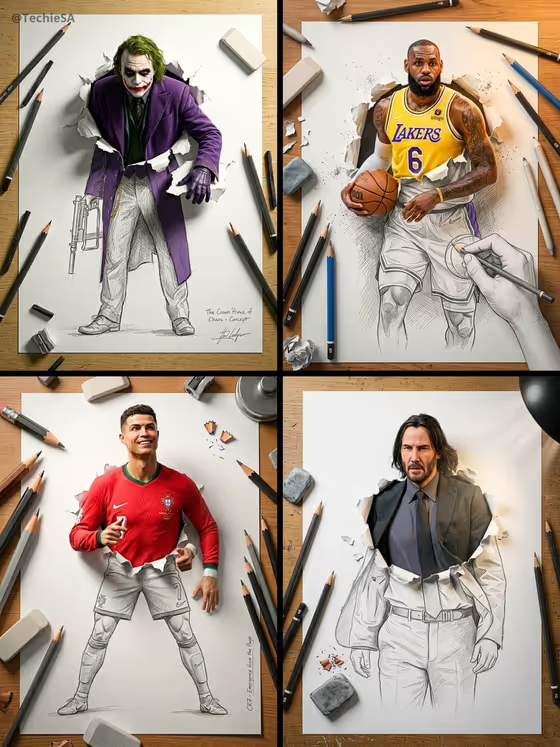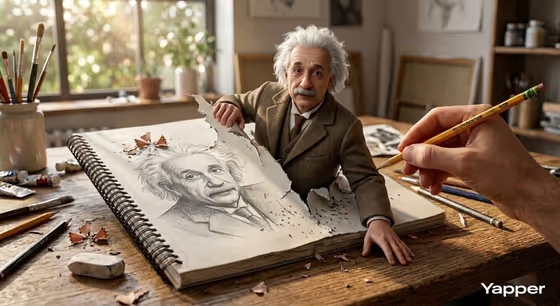
This template makes a hyper-realistic 3D illustration of a figure climbing out of a torn sketchbook page. A graphite drawing of the same figure stays on the paper while a lifelike version pushes through the ripped edge and steps onto a sunlit artist's desk, with a real hand holding a yellow pencil in the foreground.
It suits anyone who wants a playful 'drawn to life' image: educators, writers, social posts about a favorite thinker, or a personalized character piece. You choose who or what emerges and how the scene is framed, and the studio setting, torn paper, pencil shavings and warm window light are handled for you.
Heads up: the prompt text in this template names Einstein in its description of the figure's look, so results may lean toward that depiction even if you enter something else. Check the output against what you intended.
What works best as input
- In the 'iconic thinker character subject' field you can type a description or upload a reference photo. The listing asks for 2 or more photos, so add more than one if you go the upload route.
- If you upload, pick clear, well-lit images where the face and outfit are easy to see, ideally from slightly different angles, so the 3D figure and the graphite drawing both stay recognizable.
- If you type instead, be specific about the look: hair, clothing, expression and any signature features. The template's own examples include 'an original character' and 'my exact character reference'.
- Only use photos of yourself, people who have agreed to it, or characters you own. Avoid reference images that are blurry, heavily filtered or cropped so tightly that clothing and posture are lost.
How to use it
- Open the Sketchbook Thinker Illusion template in Phosphene.
- In 'iconic thinker character subject', describe your figure or upload your reference photos.
- Choose an option in 'Character staging' (for example collectible character portrait, full-body character scene or environmental story moment) to set how the finished image is framed.
- Generate the image, then review the 3:4 result. Check that the drawing on the page and the 3D figure match each other, and adjust your inputs and run again if not.
Tips for a better result
- Describe the outfit and expression in the subject field, since the figure is meant to look curious and amazed as it steps into the real world.
- Try different 'Character staging' options to compare a close collectible-style portrait with a wider scene that shows more of the desk.
- Use the same reference photos on a second run with a slightly reworded description to get a variation without losing likeness.
- For original characters, include distinctive colors and accessories so they read clearly in both pencil and 3D form.
Common mistakes
- Uploading only one photo or a low-quality image, which gives the template little to match for the figure's face and clothing.
- Writing a vague subject like 'a person' with no details, which leaves the look up to guesswork.
- Expecting the scene layout to change: the sketchbook, desk, studio light and pencil hand are fixed parts of this template.
FAQ
Can I use a photo of myself?
Yes, the subject field accepts an uploaded reference, and the listing asks for 2 or more photos. Clear, well-lit shots work best.
Can I make an original character instead of a real person?
Yes. The field's examples include 'an original character' and 'my exact character reference', so you can describe or upload your own design.
What does 'Character staging' change?
It sets how the image is framed, with options such as a collectible character portrait, a full-body character scene or an environmental story moment.
Why does my result look like Einstein?
The template's underlying prompt describes Einstein's features and clothing, so that look can bleed into results. Detailed descriptions or reference photos help steer the figure toward your subject, but check the output.