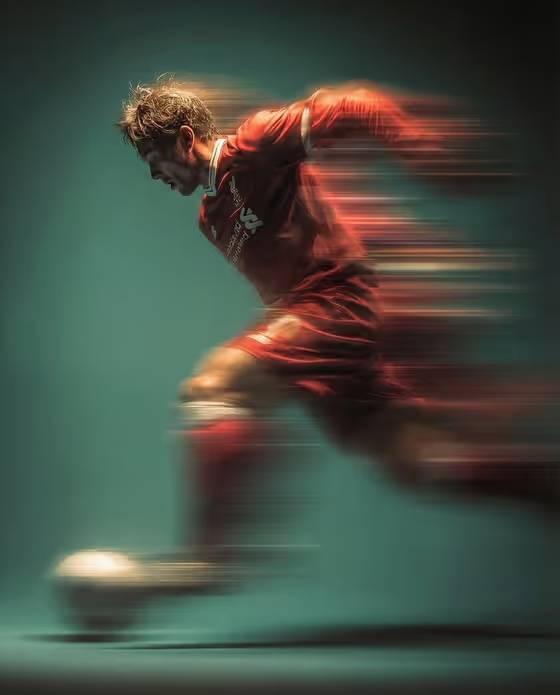
Soccer Panning Shot turns a subject into a dramatic sports action frame: a player caught mid-air in a kick, with the red jersey and the background pulled into long horizontal streaks of motion blur. The cover image shows the look clearly, a sharp face and torso against a smooth teal-green backdrop, with the ball and limbs smeared by speed.
It suits fans, amateur players, and anyone who wants a stylized football portrait for a profile picture, poster, or social post. The output is a single 3:4 image, so it works well as a vertical piece.
What works best as input
- The first field, "football player portrait subject", accepts either a short text description or an uploaded photo of the exact person or subject you want in the shot.
- If you upload a photo, pick a clear, well-lit picture of the person's face and upper body so the likeness carries into the blurred action frame.
- If you type instead, keep it simple and concrete, like "a football player" or "an editorial portrait subject", the same way the field's examples do.
- Only use photos of yourself or people who have agreed to be featured, and avoid using the likeness of public figures.
- The "Pose and scene" field is a choice, not an upload. Pick the framing option that matches how close or wide you want the result.
How to use it
- Open the Soccer Panning Shot template in Phosphene.
- Fill in "football player portrait subject" by describing who or what the image should feature, or by uploading a reference photo.
- Choose an option in "Pose and scene" to set how the image is framed, such as a close portrait or a full-body frame.
- Generate the image, then review the face, jersey, and blur. If it is not what you wanted, adjust your subject description or framing choice and run it again.
Tips for a better result
- Try different framing choices in "Pose and scene" to compare an intimate close portrait with a full-body editorial frame of the same subject.
- Keep your subject description short and focused. The template already sets the red jersey, mid-air kick, motion blur, and green gradient background, so extra styling words may not be needed.
- Use a reference photo with a clear, front or side-facing face if you want the sharp, readable profile seen on the cover image.
- Run the same subject a few times and pick the frame where the blur streaks land best across the jersey and ball.
Common mistakes
- Describing a different outfit or background in the subject field. The red jersey, ball, and light green gradient backdrop are part of the template's fixed look.
- Uploading a small, dark, or heavily cropped photo, which gives the generation little to work with for the face.
- Expecting the whole frame to be sharp. Strong motion blur on the limbs, jersey, and background is the point of this style.
FAQ
Can I upload my own photo?
Yes. The subject field accepts a photo of the person or subject you want, or you can describe them in text instead.
Can I change the jersey color or the background?
The template's direction fixes a red soccer jersey, a mid-air kick, and a light green gradient background with streaking lights. Your inputs control the subject and the framing.
What does the Pose and scene field do?
It is a choice field that sets how the shot is framed, with options like a close portrait, a full-body editorial frame, or an environmental candid frame.
What shape is the result?
The template outputs a single image in a 3:4 vertical aspect ratio.