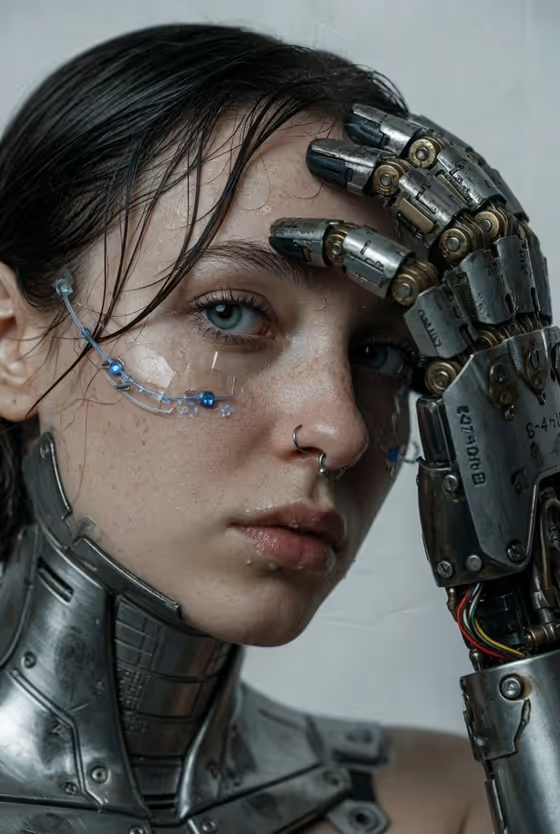
This template creates a close-up cybernetic portrait in a 3:4 frame. A person or character appears in an extreme close-up beside a weathered mechanical prosthetic hand with exposed wiring, hydraulic parts and scratched metal, set against a plain grey-white studio backdrop.
It suits anyone who wants a gritty, futuristic, editorial-style image of a person or original character: profile pictures, concept art, cover art or sci-fi mood pieces. The look is cool, desaturated and high contrast, with detailed skin, damp hair and brushed-steel plating on the neck and jaw.'
What works best as input
- The template asks for 2 or more photos. Use clear, well-lit shots of the same person or character so the face stays recognizable in the close-up.
- Choose references with the face fully visible and in focus. Skip heavy filters, sunglasses and strong shadows across the eyes, since the finished image centers on the eye area.
- Use only photos of yourself or of people who have agreed to appear in the image, and keep the subject's features true to the references.
- If you describe the subject in the first field instead, name specifics such as skin tone, hair, eye color and any accessory (the cover shows a septum ring and damp dark hair).
- Add a front-facing reference or two at similar framing, because the result is a tight portrait with the hand near the face.
How to use it
- Open the Cybernetic Hand Portrait template in Phosphene.
- In the subject field (the one labelled for the cybernetic portrait subject), describe the person or character, or add your reference photos.
- Pick an option in Character staging to set how the image is framed. The first option is the extreme close-up portrait, which matches the cover.
- Generate the image, then check the face, the mechanical hand and the wiring, and run it again with adjusted inputs if something is off.
Tips for a better result
- Be specific in the subject description. Details like freckles, damp dark hair or eye color give the portrait a stronger identity.
- Try the other Character staging options, such as collectible character portrait or environmental story moment, to see how the same subject reads in a different frame.
- Keep the subject description short and visual. The template already handles the metal hand, wiring, lighting and grey-white backdrop.
- Compare a photo-based run with a text-only description of an original character to see which gives you the look you want.
Common mistakes
- Uploading only one photo or very different-looking photos, which makes the face less consistent.
- Writing long scene descriptions in the subject field. Background and lighting are already part of the template, so extra scenery tends to compete with it.
- Using low-resolution or heavily shadowed references, which hides the eye detail this close-up depends on.
FAQ
Do I have to upload photos?
The template is set up for 2 or more photos, but the subject field also accepts a written description of a person or character.
What aspect ratio does it produce?
The output is a 3:4 portrait image.
Can I change the background or the hand?
The mechanical hand, wiring and neutral studio backdrop are fixed parts of this template's style. What you control is the subject and the Character staging option.
Can I use it for an original character?
Yes. The subject field lists examples such as an original character, so you can describe your own character or add a reference image of them.