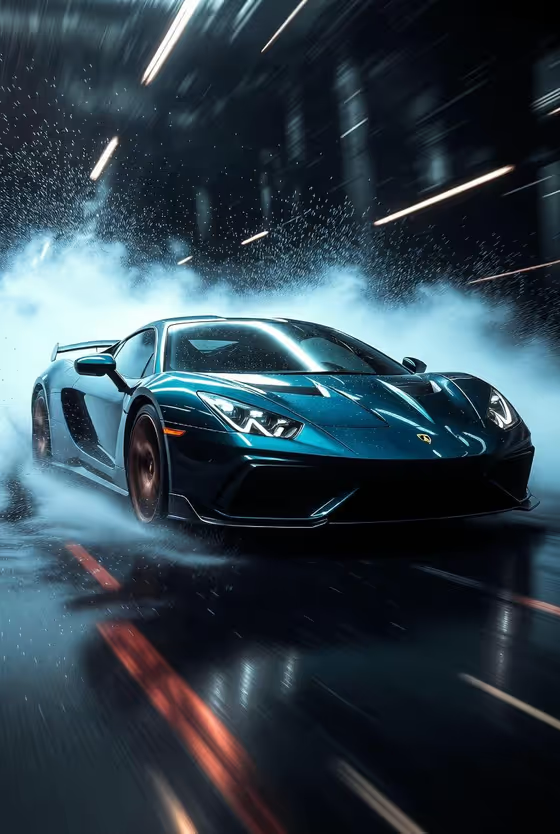
Sports Car Rain Impact turns a car into a dramatic hero shot taken from a low front three-quarter angle. The vehicle sits inside rain mist and bright speed streaks, with glossy paint highlights and a dark, minimal background, much like the teal sports car on the cover.
It suits car owners, dealers, automotive creators and anyone who needs a poster-style vehicle image. The result is a single 3:4 portrait image, so it works well for vertical posts, wallpapers and promo art.
What works best as input
- Use a clear photo of the car where the whole body is visible, so the shape, wheels and proportions can be read and carried into the result.
- Pick a shot with the car well lit and not hidden behind other objects. Clean reflections and visible paint colour give the template more to work with.
- If you describe the car instead, be specific about type, colour and finish, for example "black luxury sports coupe" or "red electric performance car".
- Keep the Vehicle product or car field to one vehicle. Mentioning several cars in one field can confuse the result.
How to use it
- Open the Sports Car Rain Impact template in Phosphene.
- In the Vehicle product or car field, describe your car or upload a matching reference photo of it.
- Set the Speed effect field, for example rain mist and white light streaks, water burst and red trails, or fine spray and blue motion lines.
- Generate the image, then check that the car body, wheels and paint look right and the streaks and droplets suit the mood you wanted.
Tips for a better result
- Try different Speed effect choices on the same car. Red trails give a warmer, more aggressive feel, while blue motion lines and white streaks feel cooler, as in the cover.
- Match the effect to the car's colour. A dark or teal car stands out against white mist, and a lighter car may read better with darker or colourful trails.
- Be precise about colour and finish in your description (gloss black, metallic silver) so the paint reflections look believable.
- Generate a few times and keep the version where the wheels and front end are sharpest.
Common mistakes
- Using a cropped, dark or blurry car photo, which leaves the template guessing at body shape and details.
- Writing a vague description like "fast car" instead of naming the type and colour.
- Piling extra scene requests into the Speed effect field. It works best with a single clear effect such as mist, spray or light trails.
FAQ
Do I have to upload a photo?
No. The Vehicle product or car field accepts a text description, and it also accepts a matching reference photo if you want your own car shown.
What angle will the car be shown from?
The template uses a low front three-quarter view, so you see the front and one side of the car from near ground level.
What format is the result?
It is a single image in 3:4 portrait ratio.
Can I change the speed effect?
Yes. The Speed effect field lets you choose options like rain mist with white streaks, water burst with red trails, or fine spray with blue motion lines.