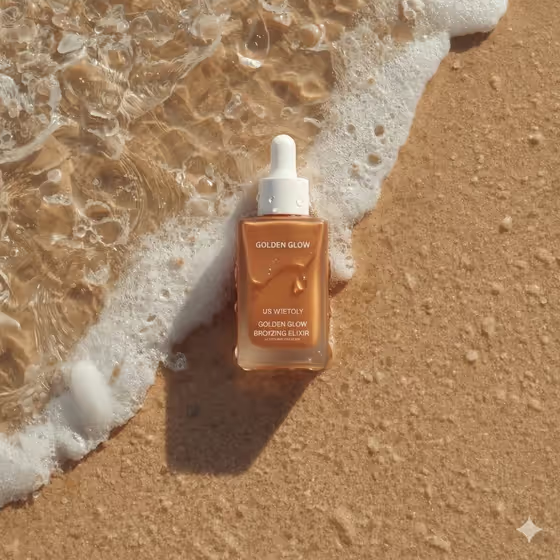
Wave-Washed Beauty Bottle turns your product into a top-down beach flat lay. The package sits diagonally on wet sand while a gentle, clear wave and sea foam wash across its base, with ripples, tiny bubbles and warm reflections around it, as in the cover image.
It suits skincare, sun care and body care brands, small shops, and anyone who needs a summer campaign-style product image without a beach shoot. The output is a 3:4 image, so it fits portrait placements like product pages and social posts.
What works best as input
- In the Beauty Product field, either describe the item in words (for example, "bronzing serum bottle") or upload a visual reference. This is the only field that accepts a photo.
- If you upload a photo, use a clear shot of the product on a plain background so its shape, cap and color are easy to read.
- If you describe it instead, name the type of product and any key visual details, like "luminous body oil" or "mineral sunscreen tube".
- In Product Name, type the exact brand text you want on the label in short capitals, such as GOLDEN TIDE or SUN VEIL. Short names tend to stay cleaner and easier to read on the label.
- For Shore Light, pick the mood that matches your brand, like warm golden hour or soft peach sunrise.
How to use it
- Open the Wave-Washed Beauty Bottle template in Phosphene.
- Fill in Beauty Product by typing a short description or uploading a reference photo of your product.
- Enter your Product Name, then choose a Shore Light option such as warm golden hour or late-afternoon bronze.
- Generate the image, then check the label text, the bottle shape and how the wave sits around the base before using it.
Tips for a better result
- Try the same product with different Shore Light choices (bright summer noon versus soft peach sunrise) to get a small set of images with different moods.
- Match the product description to the light. Amber or bronze products pair naturally with golden hour, while pale or clear products can look fresh in bright noon light.
- Use a short, distinctive Product Name. Fewer letters give the model less to get wrong on the label.
- If the first result is close but not right, regenerate and compare, since the wave, foam and ripples will vary each time.
Common mistakes
- Typing a long product name or tagline in Product Name. The label can come out garbled, so keep it to a short brand-style name.
- Writing a vague Beauty Product like "bottle" or "cream" with no photo. Without detail, the product shape and color are left to guesswork.
- Uploading a busy or cluttered reference photo, which can make the product's outline and packaging unclear.
FAQ
Do I have to upload a photo?
No. The Beauty Product field accepts either a text description or a visual reference photo. The Product Name and Shore Light fields are text or choice only.
Can I use it for something other than a bottle?
Yes. The examples include a face mist, a body oil and a sunscreen tube, so other beauty and sun care packages can work too.
What aspect ratio does it make?
The output is a 3:4 portrait image.
Why does the label text look slightly off?
Small label text is the hardest part to render. Use a short Product Name, check the result closely, and regenerate if the lettering is not clean.