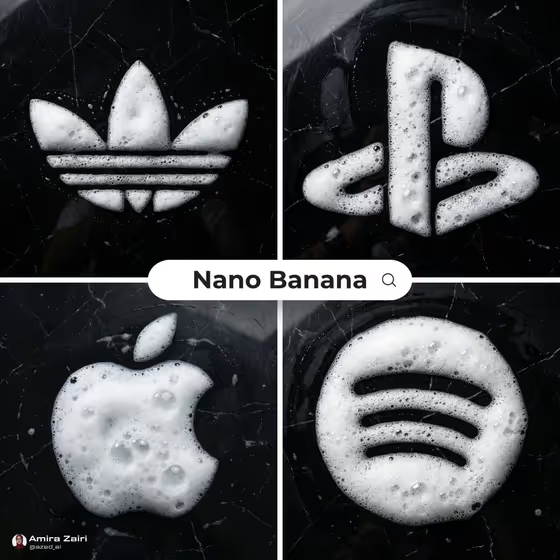
This template turns a subject into a top-down photograph where the shape is formed entirely from thick white soap foam on glossy black marble. The cover shows four bold, simple shapes (a trefoil-style mark, a game-console symbol, an apple silhouette and a circle with curved bars), each rendered with airy bubbles, wet shine and a high-contrast dark background.
It suits anyone who wants a quick, striking product-style image: concept art for a campaign, a social post, a mood board or a visual experiment. You describe the subject, pick a creative direction, and the template handles the foam, marble and overhead lighting.
What works best as input
- The Scene subject or object field accepts either text or a photo, so use whichever gives the clearest shape. A photo with a clean, high-contrast silhouette works best because foam needs a readable outline.
- Favor simple, bold forms like the ones on the cover. Dense detail, thin lines and tiny text are hard to build out of bubbles and tend to get lost.
- If you type a description, name one clear subject (for example a keepsake, an everyday object or a mechanical device) instead of a whole scene with many items.
- Use a well-lit photo with the subject centered and unobstructed, since the result is a centered, top-down composition.
How to use it
- Open the template in Phosphene and find the Scene subject or object field.
- Type a short description of your subject, or add a photo of it, using the placeholder and example chips for inspiration.
- Choose a Creative direction such as Clean editorial, Cinematic dramatic, Playful colorful or Quiet premium.
- Generate the image, then review the square result and adjust your subject or direction if the shape or mood is off.
Tips for a better result
- Start with Clean editorial or Quiet premium if you want the closest match to the cover look: white foam, black marble and minimal styling.
- Try the same subject with different Creative direction options to compare how the mood changes while the foam-on-marble idea stays the same.
- Pick subjects with chunky, connected shapes so the foam reads as one solid form with natural uneven edges.
- Keep the subject wording short and concrete. One strong noun usually beats a long list of adjectives.
Common mistakes
- Choosing a subject with fine lines, small text or many separate parts, which foam cannot reproduce cleanly.
- Describing a full scene or several objects at once, when the template is built around one centered subject.
- Using a cluttered or low-contrast photo, which makes the silhouette hard to read and can weaken the final shape.
FAQ
What does the final image look like?
A 1:1 top-down photograph of your subject formed from white soap foam on polished black marble, with visible bubbles, wet shine and soft overhead light.
Can I use a photo instead of typing?
Yes. The Scene subject or object field accepts a photo or a text description. The Creative direction field is a choice, not a photo upload.
What kinds of subjects work best?
Simple, bold shapes with a clear outline, like the symbols on the cover. Very detailed or text-heavy subjects are harder to form out of foam.
How do I change the mood?
Change the Creative direction. Options like Clean editorial, Cinematic dramatic, Playful colorful and Quiet premium shift the styling while keeping the foam and marble concept.