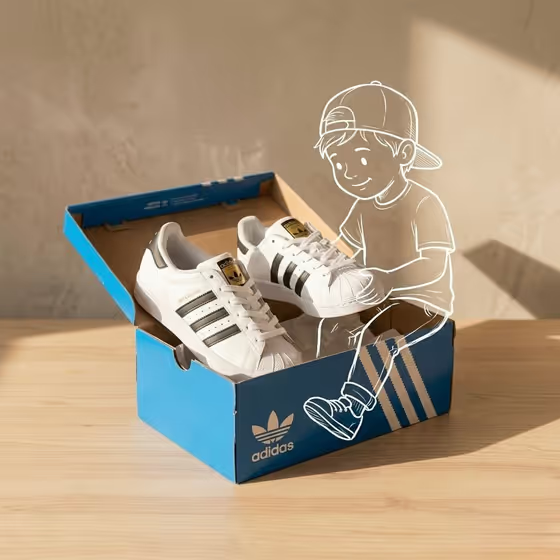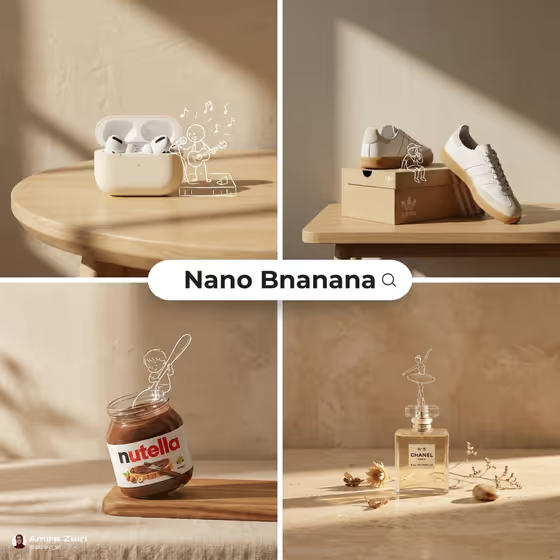
Warm Studio Sketch Companion makes a tabletop product photo where a real-looking item sits in a calm beige studio and a hand-drawn white outline character interacts with it. The cover shows the idea well: a earbud case with a tiny guitarist, sneakers with a figure sitting on the box, a spread jar with a sketched figure reaching in, and a perfume bottle topped by a line-drawn dancer.
It is built for product makers, small brands and anyone who wants a playful brand-photography look. The output is a 3:4 image with warm directional sunlight, simple props and plenty of empty wall space, so the product stays photoreal while the doodle adds the story.
What works best as input
- The template asks for 2 or more photos, so gather a clear reference of your product and a reference for the sketch companion idea. The Product setup and Sketch companion slots both accept a photo.
- For the Product setup, use a sharp, evenly lit photo where the whole item and its outline are visible. A clear silhouette gives the sketch something real to climb on, hold or lean against.
- If you describe the setup in words instead, be concrete about the arrangement, like the examples: a candle on a low stone block, a compact camera on books, a skincare tube beside a sphere.
- For the Sunlight composition field, type text only (it does not take a photo). Name one clear shadow pattern, such as a long diagonal wall shadow or a soft late-afternoon beam.
- Avoid cluttered backgrounds in your reference photos. The template adds its own beige wall and simple surface, so a busy original scene gives you less to work with.
How to use it
- Open the Warm Studio Sketch Companion template in Phosphene and read the three fields: Product setup, Sketch companion and Sunlight composition.
- Fill in Product setup with a description or a product photo, then choose or describe the Sketch companion, for example a tiny artist painting the package.
- Type your Sunlight composition, such as window-grid light across the table or a single hard-edged morning shadow, then generate the image.
- Review the 3:4 result. Check that the white outline lines up with the real shape of the product, then adjust a field and generate again if something feels off.
Tips for a better result
- Pick a companion action that matches the product's shape. A tall bottle suits a balancing or dancing figure, while a jar or box suits someone reaching in or sitting on top.
- Try different light patterns on the same product. A hard-edged morning shadow feels crisp and graphic, while a soft late-afternoon beam feels gentler and more golden.
- Keep the Product setup simple, one hero item with maybe one supporting object, so the shallow focus and negative space can do their job.
- Use the example phrases as a starting point and swap one detail at a time, like changing the gardener watering the product to a curious figure opening an imagined door.
Common mistakes
- Describing too many products or props at once. The template is designed around one product with restrained props, and a crowded setup weakens the clean look.
- Leaving the Sunlight composition vague, like just saying sunny. Without a named shadow pattern, the wall and tabletop lose the directional light that defines this style.
- Choosing a companion action that does not fit the product, so the doodle's hands or feet have nothing natural to touch.
FAQ
Do I have to upload photos?
The template is set up for 2 or more photos, and the Product setup and Sketch companion fields both accept a photo. Product setup can also be a written description.
Can I put text or a logo on the image?
The fixed direction asks for no extra text or watermark, so the template is not meant for adding captions or overlays.
Why does the character look like a white line drawing?
That is the intended style. The character is always a hand-drawn white outline that interacts with the real product, which stays photoreal beneath it.
Can I change the light in the scene?
Yes. The Sunlight composition field lets you describe the shadow pattern, for example a long diagonal wall shadow or a soft late-afternoon beam.