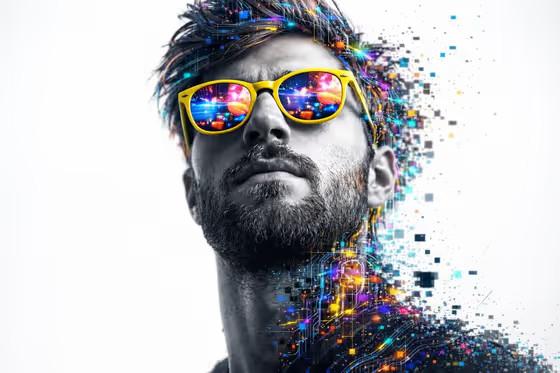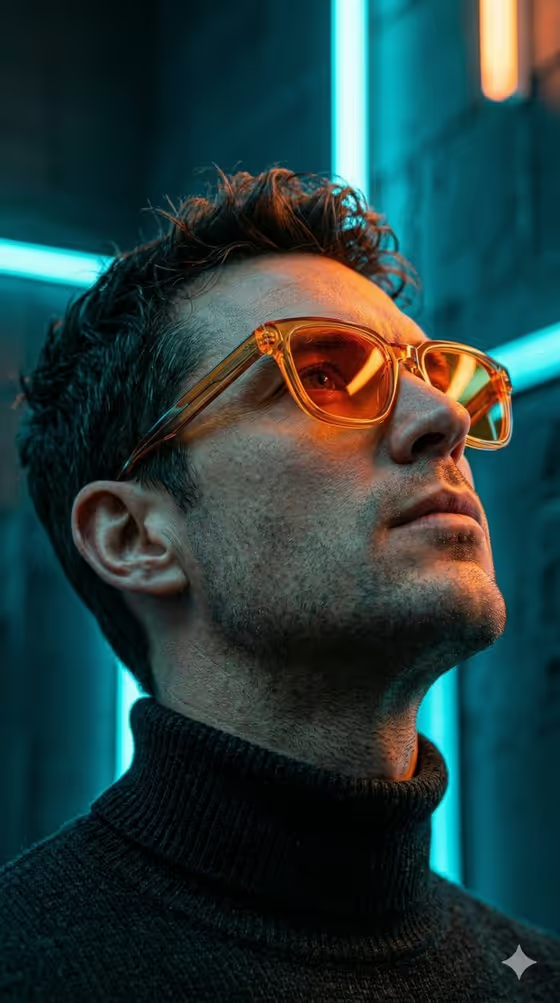
Worm Eye Profile turns a reference portrait into a dramatic low-angle profile shot. The camera sits below the face and looks up, so the subject gazes skyward with a sharp jawline, natural stubble and visible skin texture. The cover shows the look: a dark turtleneck, tinted retro-style glasses, and strong cyan and orange neon light against a deep blue background.
It suits anyone who wants a moody, cinematic, editorial-style portrait for a profile picture, a creative project or a stylized headshot. It works best for portraits of men, since the template's direction describes a man with short, slightly tousled dark hair.
What works best as input
- In the first field, labeled "man in my reference portrait subject", you can type a description or upload a reference photo. A clear, well-lit face gives the template the most to work from.
- Pick a photo where the face is fully visible and in focus, with no heavy filters. The template aims for realistic pores and natural texture, so a sharp source helps.
- If you type instead of uploading, keep it short and concrete, like the placeholder "the man in my reference" or "an editorial portrait subject".
- Only upload photos of yourself or people who have agreed to it, and keep the subject recognizably the person you intend.
How to use it
- Open the Worm Eye Profile template in Phosphene.
- In the first field, upload your reference portrait or describe the subject in text.
- In the "Pose and scene" field, choose how the shot is framed, such as an intimate close portrait or an environmental candid frame.
- Generate the image, then check the result for a clear upward gaze, defined jawline and natural skin before using or saving it.
Tips for a better result
- Try the different options in "Pose and scene" to compare a tight close portrait with a wider editorial or candid frame. The low-angle upward look stays the template's signature.
- Start from a reference where the person's hair and face shape are clearly visible, since the template draws on the reference for facial proportions and overall appearance.
- Run it with a few different reference photos of the same person and keep the one where the expression and likeness feel most natural.
- If a result feels off, adjust the wording in the first field to be clearer rather than longer.
Common mistakes
- Using a blurry, dark or heavily filtered reference photo, which gives the template little real detail to preserve.
- Writing a long, cluttered description in the first field. A short, clear subject works better than stacking many details.
- Expecting a different style. This template is built for a realistic, cinematic, neon-lit profile look, not a cartoon, painting or 3D render.
FAQ
Do I have to upload a photo?
The first field accepts either a text description or an uploaded reference, so you can use whichever fits. A reference photo is the best way to carry over a specific person's look.
What does the result look like?
A vertical 3:4 image of a face from the neck up, shot from a very low angle with an upward gaze, defined jawline, natural stubble and realistic skin texture.
Can I change the setting or framing?
Yes, the "Pose and scene" field lets you choose how the shot is framed. The core low-angle, high-contrast neon look is fixed by the template.
Will the sunglasses and outfit always appear?
The template is written around a dark turtleneck and tinted retro-style glasses, as in the cover, but outputs can vary, so review each result.