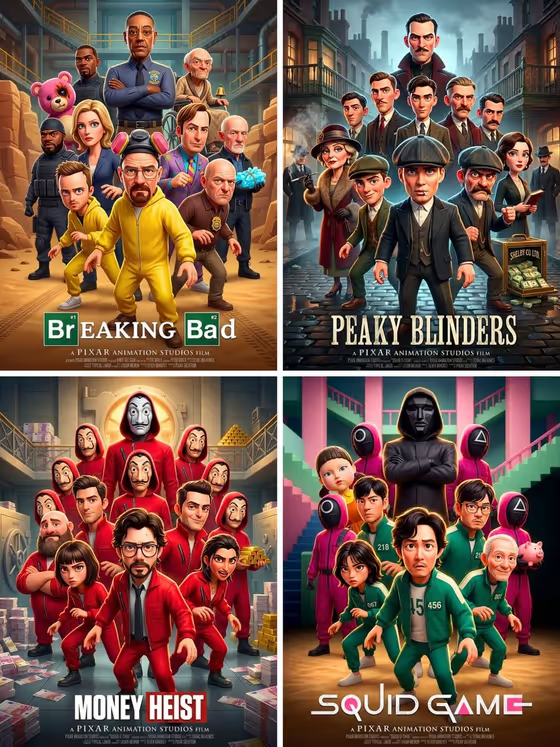
Animated Ensemble Poster turns a story idea into a 3D animated movie or show poster. A hero stands front and center, with allies and villains fanned out behind in dynamic poses, and the title sits in bold lettering along the bottom.
It suits anyone who wants a poster for a story they are inventing: a pitch image for a project, a themed mock-up for a game night, a cover for a school or hobby story, or just a fun concept piece. The result is a 3:4 image, and you only fill in two text fields.
What works best as input
- This template has no photo upload. Both fields are text, so all the creative direction comes from what you write.
- In Movie or Show Design, name the genre and the world in a short phrase, such as a space-adventure saga, a fantasy school story, a superhero team, or a whimsical monster world.
- Add one or two concrete details about the setting or the cast (a ragtag crew, a castle in the clouds, a masked villain) so the hero, allies and villains have something specific to build from.
- In Movie or Show Title, type the exact text you want printed at the bottom. Short, punchy titles in capitals, like the STARBOUND placeholder, tend to suit bold poster lettering.
How to use it
- Open the Animated Ensemble Poster template in Phosphene.
- Fill in Movie or Show Design with a short description of the story world and its genre.
- Type your title into Movie or Show Title, checking the spelling since it will appear as large text on the poster.
- Generate the image, then review the hero, the supporting cast and the title text. If something is off, adjust your wording and generate again.
Tips for a better result
- Let the world drive the mood. The template matches the background palette to your story, so a description with a clear setting (a neon city, a snowy kingdom, a candy-colored monster town) gives a more distinct look.
- Try the example ideas as a starting point, then swap in your own twist, for example turning a fantasy school story into a fantasy school story with a mischievous dragon mascot.
- Keep the design description focused on one idea. A single clear premise usually reads better in a crowded ensemble layout than a long list of unrelated elements.
- Generate a few variations of the same title with slightly different design descriptions to compare tones, such as comic versus dramatic.
Common mistakes
- Writing a very long or tangled description. The poster has to fit a whole cast around one hero, so an overloaded prompt can blur the focus.
- Entering a long or hard-to-read title. Lengthy titles are harder to render cleanly in bold bottom typography, so keep it short and double-check the spelling.
- Expecting a specific real character or existing franchise look. Describe your own invented world and characters instead of relying on a name to carry the design.
FAQ
Do I need to upload a photo?
No. This template only has two text fields, Movie or Show Design and Movie or Show Title, and it does not accept a photo.
What shape is the poster?
The output is a 3:4 image, a portrait format that suits a poster layout.
Can I choose who the hero is?
You steer it through your design description. The template places the most recognizable hero front and center, with allies and villains behind, so describing the kind of hero and cast you imagine helps.
Where does the title appear?
The text from Movie or Show Title is set in bold typography along the bottom of the poster.