Edit Drift: Why Repeated AI Image Edits Silently Change the Subject (and How to Stop It)
The first few conversational edits on an AI image look great. Keep asking and the face slowly becomes someone else. A Japanese creator calls this edit drift: past instructions pile up until the model has no room left. Here is the mechanism and a protocol for edits that stay clean.
AI-assisted draft. Reviewed and edited by the Phosphene team before publication.
On this page
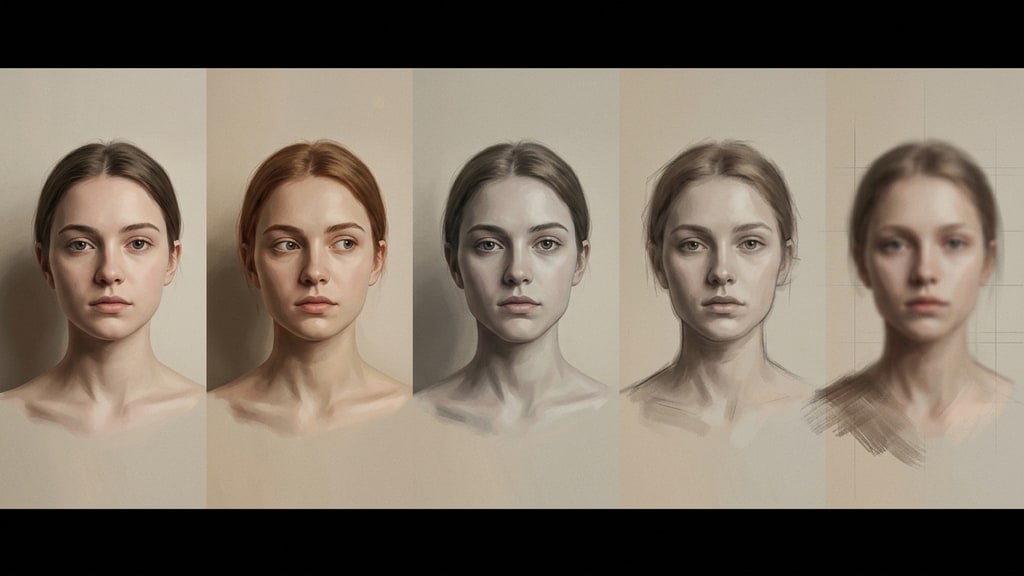
The first three edits feel like cheating. You move the subject to a new scene, change the lighting, fix the composition, and the model keeps the face, the hair, the clothes. Then you ask for one more small thing. And one more. Somewhere around the sixth round you stop and look at it properly, and the person in the picture is no longer the person you started with.
A Japanese creator who tests this stuff daily calls it edit drift. The term is worth knowing, because drift is the one image-editing failure that does not announce itself.
The strength that hides the weakness
ChatGPT Images 2.5, released in September 2026, earned its reputation for holding onto what you give it. Open an image of a person and ask to place them in a Tokyo cafe or a night office, and the facial features and hairstyle survive. Change the pose and the angle and the same person comes out the other side. Product photos keep their shape while the background gets swapped. The official materials and early tests line up on that.
That capability is exactly why people push the conversation too far. It works so well for the first few rounds that you trust it with every correction you can think of. The tool stops feeling like a dice roll and starts feeling like a collaborator. That trust is what makes drift dangerous.
What drift actually is
Edit drift, at least as ZEN describes it from his own testing, is a constraint pile-up. Every round of conversation adds instructions the model has to satisfy all at once. The prompt is not the hard part anymore. The hard part is the accumulated history: keep the face, keep the lighting from round two, keep the composition from round four, now make the jacket blue. Each new request competes with everything before it, and at some point the model has no clean way to satisfy all of them at once.
The result is not a crash. The result is a slow compromise. Earlier instructions get weakened to make room for later ones. The face shifts because the model is bending the identity to fit the accumulated constraints. Style details wash out. The image may degrade a little with every round, and because each individual change is small, you rarely notice until the final version has drifted far from the original.
That is the key difference between drift and a normal failed generation. A failed generation is loud: you see the broken hand or the melted face right away and you regenerate. Drift is quiet. Every intermediate result looks acceptable, so you keep going, and the failure only shows once you compare the last image against the first.
The honest caveat
The six-round threshold is not a benchmark. It comes from ZEN's own repeated tests, and different images will break at different points. A scene with a single subject and no strict identity requirements can survive more rounds than a character portrait where the face is the whole point. Treat six as a warning sign, not a law: past a handful of rounds, check the result against the original instead of trusting the latest render.
The protocol: spend instructions like a budget
The fix is not to edit harder. The fix is to change how many instructions each piece of work consumes.
Batch the edits into fewer rounds. Before you touch the editor, write down every change you want. Then send them together. One round with five requests is far safer than five rounds with one request each, because each new round is where the model reinterprets everything you ever said.
Draw instead of describing. When position matters, you do not need to find the words. Rough sketch input and partial-comment editing let you mark the image itself: person here, text there, this corner stays. The layout stops being a guessing game about what your words meant, and the instruction count collapses. ZEN's own rule is to keep the round trip inside about three exchanges, and sketches are the main reason that is possible.
Let the first pass be good enough. There is a reflex to negotiate every flaw away in the chat until the image is "perfect." That is where drift happens. Ask the model for an 80 percent result, a solid base with the subject, mood, and colors right, then finish the remaining details yourself. Chasing the last 20 percent conversationally costs more than fixing it by hand, and it is the fastest route to a changed face.
Move the text out of the model entirely. Typography is the weakest part of the whole loop. Every attempt to nudge a label or tweak a headline risks redrawing the background around it. The reliable split is: the model generates the subject and the scene with clean empty space, and a design tool lays the type on top. You stop negotiating with the image generator about letters it was never good at.
Restart before you repair
The single most useful habit: when a conversation crosses your round budget, do not keep editing the edited image. Regenerate from the last version you actually liked and carry the new instruction forward as a fresh start. A clean generation with one clear request beats a tenth edit in a conversation full of stale context.
Keep the loop short. Check the latest result against the original. And if the answer to "is this still the same person" is ever "sort of," the drift has already won. Go back.