How to turn your photo into a GTA 6 style poster
The painted loading-screen look is a recipe you can name: ink outlines, cel shading, a sunset palette, and one confident hero. Here is how it works and how to make your own version from one photo.
AI-assisted draft. Reviewed and edited by the Phosphene team before publication.
On this page
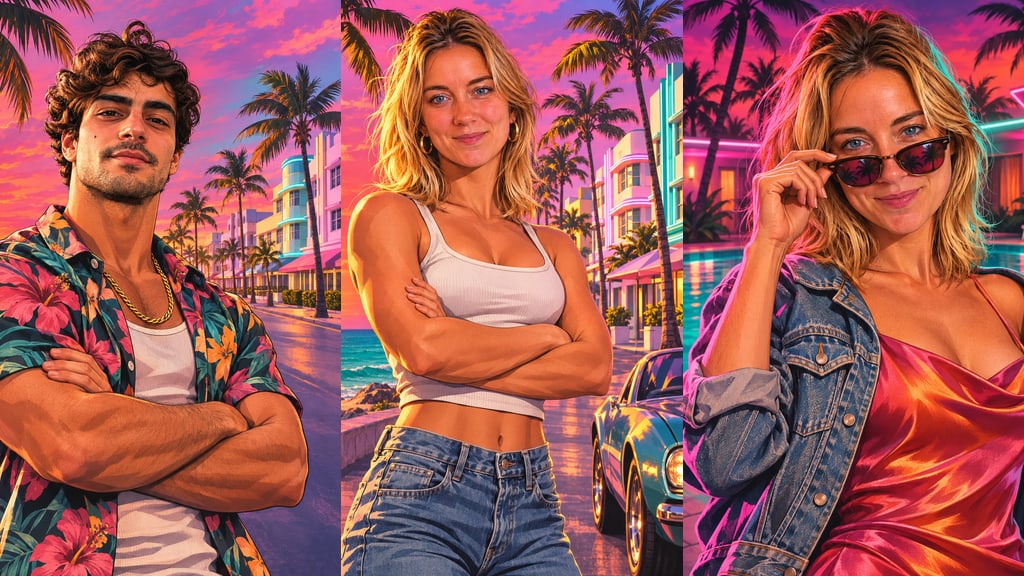
Every new trailer for GTA 6 sends a wave of people looking for the same thing: a way to see themselves in that painted, sun-soaked poster style. The look feels specific, but it is not magic. It is a small set of illustration decisions that you can name, and once you can name them you can put any face into them.
This guide breaks the style into its parts, shows what to keep and what to leave out, and walks through making your own poster from one photo with the Sunset Heist Poster template.
One note up front: Phosphene is not affiliated with Rockstar Games or Take-Two. The template makes an original poster in the genre's painted style. It never adds the game's logo, title, characters, or any text.
What makes the style recognizable
The series' loading screens and covers have used painted character art for years, and the look has a consistent grammar.
Ink outlines around every shape. Faces, hands, clothing folds, and palm fronds all sit inside a crisp dark line. That outline is what separates the style from a photo with a filter on it.
Cel shading with smooth gradients. Color comes in flat planes with hard edges between light and shadow, then a soft airbrushed blend inside the larger areas like skies and skin. It reads as hand-painted rather than rendered.
A sunset palette. Hot pink, tangerine, turquoise, and violet, with deep navy shadows. The sky does a lot of the work, and the same colors bounce onto skin and chrome.
One hero, large in the frame. The person fills most of the poster, waist-up or three-quarter length, with a pose that tells you their role at a glance: arms crossed, leaning on a car door, lowering sunglasses.
A place that says "coast". Palm trees, pastel art-deco hotels, a neon motel sign, a speedboat on turquoise water, a convertible on a coastal road.
What to leave out
The style is open to anyone. The brand belongs to its owner. Keep your poster clear of:
- the game's logo, the numeral, or any title lettering
- named characters from the trailers
- exact recreations of official artwork
The Sunset Heist Poster template already follows these rules: every result is text-free and logo-free, and the prompt never names a game. It also leaves weapons out, which keeps the poster shareable on every platform.
How to make yours
- Open Sunset Heist Poster and upload one clear photo of yourself. A front-facing selfie in daylight works best. Skip sunglasses and heavy filters, because the painted style keeps the shapes of your face and needs to see them.
- Pick a Scene: the ocean boulevard at sunset, the neon motel pool at night, a speedboat at golden hour, a convertible on the coastal highway, a swamp airboat at dusk, or a rooftop above the beach city.
- Pick a Role, which sets the pose: crew leader, getaway driver, beach boss, undercover agent, nightclub owner, or treasure hunter.
- Pick an Outfit, from the open floral shirt with a gold chain to a pastel linen suit or a satin slip dress with a denim jacket.
- Generate, check that the face reads as you, and save it.
The result is a vertical 3:4 illustration, which fits a profile picture, a story, or a printed poster.
Getting a better result
Start with the classic combination. Ocean boulevard, crew leader, floral shirt. It is the closest match to the loading-screen look and the easiest to recognize at thumbnail size.
Use night scenes for stronger color. The neon motel pool throws pink and teal light across the face. Golden-hour scenes give warmer skin and softer contrast.
Build a series. Keep the outfit and change only the scene, and you get a matching set of posters, which works well as a carousel post.
Add one concrete detail. The optional Anything else field is best for a single prop or accent: a gold watch, a red bandana, a mint-green car. One detail lands; five details fight each other.
Writing the prompt yourself
If you want to build the look by hand in any image model, the template's recipe is a good starting structure. Name the medium first, then the palette, then the person:
A vertical painted key-art illustration of the person in the reference photo as the hero of a tropical action game loading screen. Semi-realistic digital painting with crisp ink outlines, cel-shaded flat color with smooth airbrushed gradients, hard shadows, glossy highlights. Sunset palette of hot pink, tangerine, turquoise, and violet with deep navy shadows. Waist-up, arms crossed, confident expression, ocean boulevard with palm trees and pastel art-deco hotels behind. No text, no logos.
Two lines do most of the work: "crisp ink outlines" and "cel-shaded flat color". Without them, most models drift into a glossy photo with a pink grade, which is the most common reason homemade versions look off.
The short version
The GTA 6 poster look comes down to ink lines, cel shading, a sunset palette, one large confident hero, and a coastal setting. Keep the brand marks out, keep your face readable, and pick a role that tells the story in one pose. The template does the rest from a single photo.