The Case for Keeping a Legacy Model: Midjourney as an Ideation Engine
Creators usually ditch an image model once a newer one looks better. A Japanese visual magazine team argues the opposite: keep the old model for the strange, half-broken ideas it produces, then clean them up with a modern editing model.
AI-assisted draft. Reviewed and edited by the Phosphene team before publication.
On this page
The instinct when a better image model ships is to delete the old one. Same company, higher fidelity, fewer obvious mistakes. Why would anyone keep something that generates crooked fingers when they can get clean ones elsewhere?
A Japanese visual-magazine team at CreativeEdge CL+ argues the opposite, and they have a four-year track record to back it up.
Their claim is not sentimental or nostalgic. It is positional. Midjourney remains uniquely good at producing the strange, novel, slightly broken imagery that newer, higher-fidelity models filter out. When you have a visual idea that refuses to arrive, that weirdness is an asset. And now there is a clean way to use it: generate the strange idea in the legacy model, then remix it with a modern editing model that fixes the anatomy and enforces the character.
The weird output is the feature
Midjourney was the author's first generative tool when it launched in mid-2022. Four years later they describe it as an older-generation model. Popular, still, with working creatives, but technically behind. The lingering failure modes are the ones newer models mostly solved, like anatomy breaking down and skeleton structure collapsing.
That sounds like a reason to cancel. Creatives keep it anyway, for a reason you do not hear in benchmark comparisons.
A high-performing model is trained to give you the statistically likely, well-formed answer. That is its strength and its constraint. It produces images that look correct, which means it tends to converge on familiar, safe, already-seen compositions. When you are stuck, safe and familiar is exactly what you do not need.
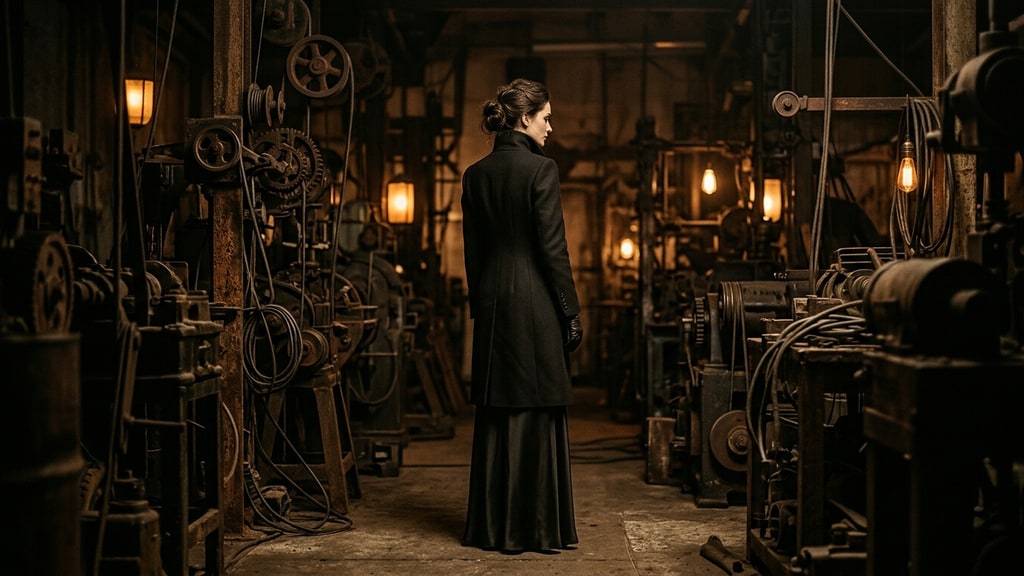
Midjourney's persistent hallucination is a bug that behaves like a feature. It will confidently produce a world that does not exist, a machine that turns into a bigger machine, a lab full of instruments that never were. Newer models can approximate strangeness, but they rarely commit to it the way a model that does not know better will. The author's phrase is direct: if you want an image that looks deliberately "AI-ish," Midjourney is the tool that does it on purpose.
So the practical rule is: do not reach for the legacy model for the final asset. Reach for it when you need a provocation, a starting point, a world you had not imagined.
The author's example prompt shows how far you can push the machine aesthetic:
When she operated this huge machine, it began to move in detail, transforming itself into an even larger machine. The machine was in operation, and small lamps were flashing brightly. --ar 16:9 --exp 100 --quality 4 --raw --stylize 1000 --v 7
Small tweaks produce large creative forks. Bump the stylize value and you get a different mood entirely. Raise the chaos or set --weird to a numeric value such as 50 and the scene drifts toward a different genre, from industrial fantasy to retro science-fiction color. One cost note on that example prompt: --quality 4 uses roughly four times the GPU time of --quality 1, so it is fine for a single hero frame but overkill across a wide exploration batch — for generating ideas, --quality 1 is usually enough to judge. The source recommends treating those parameters as a knobs-first exploration: generate a batch, let the failures surprise you, and save the ones that open a door.
V7 over V8.2 for the ideation pass
The author deliberately works in version 7 even though 8.2 is out. That is not being behind the times. It is a preference for the older model's willingness to be strange.
In a side-by-side comparison with the same surrealist prompt, v7 leaned into layered, intricate, slightly unruly composition, while 8.2 produced a cleaner, more composed result. For producing a final wall-ready illustration, 8.2 is arguably better. For generating raw material that still has room to be shaped, v7's excess gives you more to work with.
That distinction, raw material versus finished product, is the whole workflow.
Remix is how you make the strange idea usable
The broken skeleton is the liability. Any character or editorial piece built directly on a Midjourney base inherits the bad joints, the warped fingers, the anatomy that is almost right. Publish that and it reads as a failure.
The fix is a remix pass with a modern editing model. The team uses Nano Banana Pro, running inside Figma Weave. The workflow is simple in principle:
- Generate the strange concept in Midjourney.
- Take the character reference you actually need for the publication, often just the face.
- Ask Nano Banana Pro (or ChatGPT Images 2.0 for similar control) to swap the reference into the generated scene and correct the details, like replacing the face and hairstyle, or dialing the makeup down to natural.
- Confirm the corrected pose and check that the previously broken joints now read correctly.
A concrete instruction used in the source:
Replace the gorgeous female face and hairstyle. Light makeup.
What sounds like a tiny request hides the real gain. The remix model does not just paste a face on a body. It takes the loose, hallucinated scene and re-renders the figure with a correct skeleton, correct finger joints, and natural, plausible posture. The result keeps the world that Midjourney invented, but drops the anatomical noise that would have exposed the image as unedited AI output.
This works because modern editing models can act on descriptive, specialist instructions about color grading, texture, material, and pose in a way older models could not. You can ask for the skin quality of one reference and the atmosphere of another in the same sentence.
Mind your upscaling lane
The source flags one practical cost decision. If the remix model returns the image at 2K, you may want to upscale it for print, for example with Topaz Bloom. If the remix model can output at 4K directly, the upscale step is often unnecessary — but a 4K source is not automatic proof: what matters is the effective PPI at the final placed size including bleed, so confirm the printer's required resolution, color profile, and PDF requirements before deciding you can skip upscaling.
This is a credit-and-quality tradeoff, not a rule. The point is to decide before you render: pick the resolution you need, choose the lane that gets you there without wasting generations or paying for an upscale you do not need. For a print project, resolution is not cosmetic, so it is worth planning rather than discovering the gap after the fact.
Why a physical object beats a feed
The whole project exists because the team deliberately publishes a print visual magazine. That choice is part of the argument, not decoration.
Digital media has optimized the efficiency of passing information. Scroll, absorb, forget. A printed magazine does something else. It becomes an object you own, with a texture, a weight, page turns. The author describes it not as "a medium to read" but "a work to own."
That reframing changes what the tools are for. When a piece of content is going into a feed, it competes for a split second of attention and the safest composition often wins. When a piece is going into an object that someone will hold and keep, you can afford the stranger image, the world you are not sure everyone will like. You are not optimizing for the algorithm's approval. You are optimizing for the handful of people who share your taste and will keep the thing on their shelf.
The workflow exists to feed that bigger goal: character consistency, a coherent visual world, layouts that survive being looked at for more than a second.
A three-lane pipeline worth copying
Pulled together, the source's process is a clean three-lane pipeline you can reuse regardless of which exact tools you prefer.
First, the ideation lane. This is the legacy, high-hallucination model. Its only job is volume and novelty. Generate a wide batch, lean on stylize, chaos, and weird parameters, and collect the surprising frames rather than the clean ones.
Second, the focus lane. Take a promising frame and combine it with your character or subject reference. A modern editing model reconciles the reference with the scene, correcting anatomy and enforcing consistency that the ideation model cannot.
Third, the delivery lane. Choose the final resolution, in-model 4K if available or an upscale pass if not, and place the result into the actual layout. Check it in context, at print size, not zoomed into a preview.
The lane boundaries are what make it robust. You never ask the legacy model for the final asset, and you never let its raw output go to print with the broken skeleton intact. Each model handles the job it is good at, and the bottlenecks you expect from an old model can be largely reduced by the remix pass — still do the final check at print size before publication.
The deeper lesson is the one most upgrade-chasing misses. A model's "flaws" are only liabilities if you treat every output as a finished product. The moment you treat output as raw material for a later pass, the weird, unpredictable model stops being the tool you abandoned and becomes the tool that starts your ideas.
Keep the old model subscribed, this team says. You will not use it every day. But the day your visual well runs dry, it is the only tool that will hand you something you did not know you were looking for.