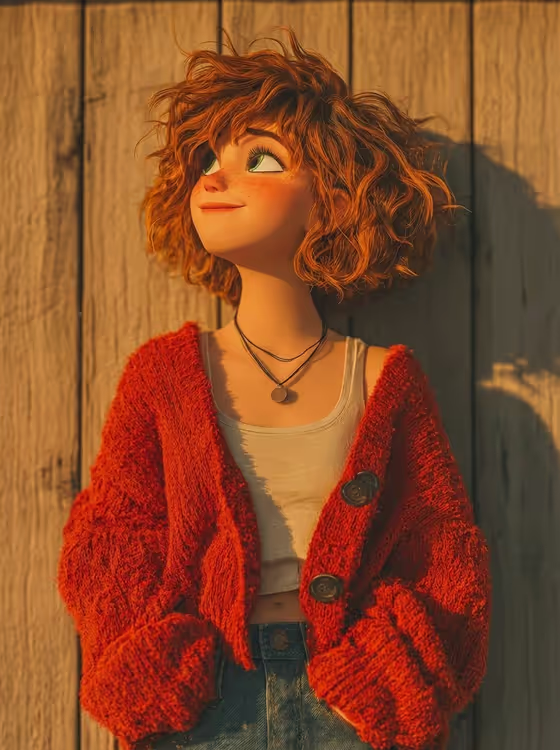
Autumn Cardigan Character turns a person or a described character into a cozy animated 3D portrait. The cover shows the look: a freckled young woman with loose copper curls, a chunky red knit cardigan and a hopeful upward glance, leaning against a worn wooden wall in warm golden light.
It suits anyone who wants a stylized, storybook-like portrait for an avatar, a profile picture or a seasonal post. You pick who the character is and what they wear, and the template handles the pose, lighting and 3D look in a 3:4 portrait frame.
What works best as input
- For the Portrait character subject field, you can type a short description such as a freckled ginger-haired young woman, or upload a matching reference photo. The template notes it needs 2 or more photos, so add more than one if you go the upload route.
- Pick clear, well-lit photos where the face is easy to see. Freckles, eye shape and hair texture are things the template tries to preserve, so references that show them clearly help.
- If you describe the character in words, include features that matter visually, like hair color, curl type, age range and a mood. A hopeful curly-haired child and a warm expressive adult will read quite differently.
- For the Cozy outfit field, choose from the options or describe the garment, or reference a knit outfit you like. Name the color and material, for example rust knit sweater and overalls, since chunky knit texture is a key part of the look.
How to use it
- Open the Autumn Cardigan Character template in Phosphene.
- Fill in Portrait character subject by typing a description or adding your reference photos (2 or more).
- Set Cozy outfit by choosing an option or describing the knit outfit you want, such as an oversized red cardigan and denim.
- Generate the image, then check the result for the expressive eyes, curls, knit texture and golden light, and adjust your fields if something is off.
Tips for a better result
- Try the outfit examples as a starting point: forest cardigan and cream trousers gives a cooler, greener palette than the red cardigan in the cover.
- Be specific about hair. Loose curls are part of the template's look, so mentioning curl type or length gives the character more personality.
- Vary the subject while keeping the outfit the same (or the reverse) to compare results and find the combination you like best.
- Keep the description focused on one character. The template is built around a single portrait against a wooden wall, so extra scene details may not fit.
Common mistakes
- Uploading only one photo when the template expects 2 or more, which gives less reference to work from.
- Using dark, blurry or heavily filtered photos, which makes it harder to carry over facial features and freckles.
- Writing a vague outfit like nice clothes. Without a color and fabric, you lose the tactile chunky knit that defines this style.
FAQ
Do I have to upload photos?
Not necessarily. The subject field also accepts a text description, and the outfit can be chosen or described. If you do use photos, the template asks for 2 or more.
Will the result look like a real photo?
No. The template creates an animated 3D character portrait with soft skin shading and a polished, stylized look.
Can I change the background?
The direction is fixed to a rustic, worn wooden wall with warm autumn sunlight, so the setting stays consistent. You control the character and the outfit.
What shape is the output?
A 3:4 portrait image, as shown on the cover.