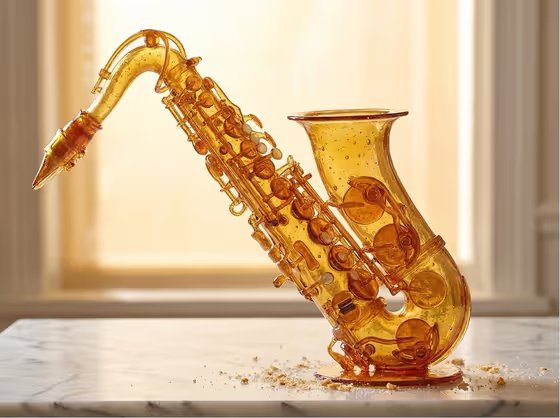
This template rebuilds an object as if it were a patisserie showpiece made entirely of pulled and blown sugar. The result is a glossy, translucent amber version of your subject, with visible sugar techniques like pulled ribbons, blown bubbles and cast pieces joined with caramel, sitting on a marble pastry surface or against a cream backdrop.
It suits anyone who wants a striking concept image of a product or object in an edible-luxury style, such as designers, brand teams, food creatives or hobbyists who like unusual material experiments. The cover shows a saxophone built from amber sugar with air bubbles, key mechanisms and a few crumbs on marble, lit by warm window light.
What works best as input
- For the Featured product or object field, you can describe your object in words or use a photo of it. Pick one clear subject rather than a whole scene.
- Choose objects with recognizable, interesting shapes, like the saxophone in the cover. Keys, curves, handles and moving parts give the sugar work more to show off.
- If you use a photo, pick one where the object is fully visible, well lit and not buried in clutter, so its outline and key details carry over.
- If you type a description, be specific about the object type, for example 'a premium beverage bottle' or 'a compact consumer device', instead of something vague like 'a thing'.
How to use it
- Open the Blown Sugar Patisserie Object template in Phosphene.
- In Featured product or object, describe your object or add a photo of it. The slot accepts either.
- Set Creative direction, for example Clean editorial, Cinematic dramatic, Playful colorful or Quiet premium.
- Generate the image, then review the amber translucency, bubbles and marble surface. Adjust your object description or direction and run it again if you want a different take.
Tips for a better result
- Try the same object with different Creative direction choices. Quiet premium and Playful colorful should push the mood in noticeably different ways.
- Objects with functional parts (keys, buttons, spouts, straps) tend to show the 'functional object built from sugar' idea best.
- Keep the object description short and concrete. The template already handles the material, lighting and surface, so you do not need to describe them.
- The output is a 3:4 image, so think of objects that look good in a portrait frame.
Common mistakes
- Describing several objects at once. The template rebuilds one subject, so a crowded description can muddy the result.
- Writing material instructions that fight the template, like asking for chrome or matte plastic. The look is built around translucent amber sugar.
- Using a photo where the object is small, cropped or hidden, which leaves little shape information to rebuild.
FAQ
Can I use a photo instead of typing?
Yes, the Featured product or object field accepts a photo or a text description. The Creative direction field is a choice or short description only.
What does Creative direction change?
It sets the overall mood of the visual, with options such as Clean editorial, Cinematic dramatic, Playful colorful and Quiet premium.
Will the object look exactly like my original?
The template aims to keep the defining shape and character while rebuilding it in sugar, but expect an artistic interpretation rather than an exact copy.
What kind of image do I get?
A single 3:4 image of your object in glossy amber pulled and blown sugar, usually on marble or a cream backdrop with warm, glowing light.