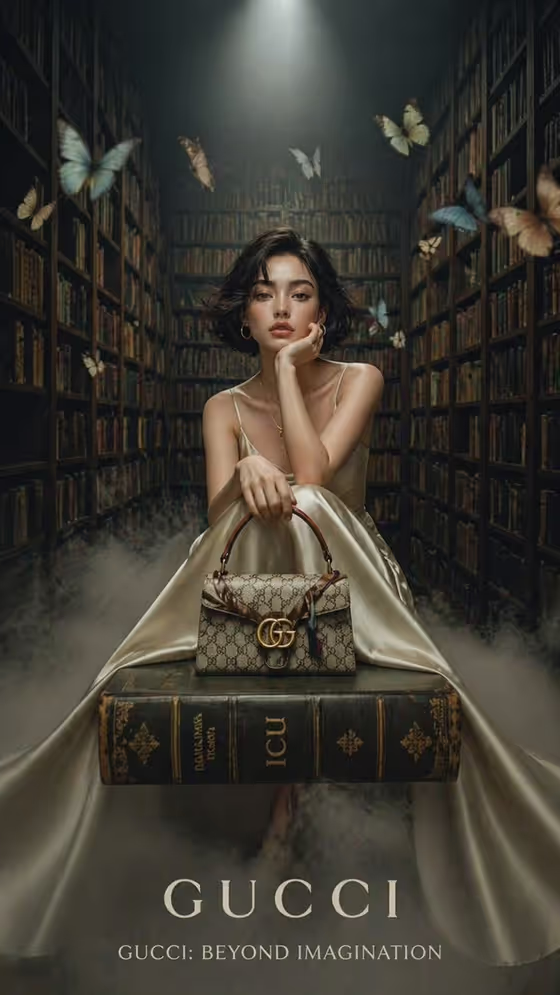
Butterflies in the Grand Library builds a fashion editorial in a tall vintage library. Your subject sits on a stack of antique books, one hand near the face, with floor fog, glowing butterflies and a single overhead spotlight around them. The result is a 3:4 portrait image with a moody, magazine-cover feel.
It suits anyone making luxury-style marketing visuals: a campaign mockup, a product feature for a bag or clutch, or a themed portrait. The designer accessory sits in front of the model and is meant to be a focal point, so it works especially well for showing off a handbag or similar piece.
What works best as input
- For Portrait person or subject, you can describe the person (the placeholder is an elegant bob-haired adult woman) or upload a matching reference photo. A clear, well-lit portrait gives the template more to work with than a small or blurry one.
- The template asks for 2 or more photos, so plan to supply a portrait plus a reference for the accessory. Use the same field-by-field logic: one image for your subject, one for the item you want featured.
- For Designer accessory, upload a clean, uncluttered photo of the exact piece, or type a short description such as structured luxury handbag, jewel clutch or sculptural leather bag.
- Couture wardrobe is a choice field and does not take a photo. Pick or enter an option like champagne flowing satin gown, deep emerald silk dress or ivory sculptural evening look.
- Keep descriptions short and concrete, naming style and material (satin, silk, leather) rather than vague words like nice or fancy.
How to use it
- Open the Butterflies in the Grand Library template in Phosphene.
- Fill in Portrait person or subject by typing a description or adding a reference photo, then set the Couture wardrobe.
- Add your Designer accessory, either as text or with a photo of the piece, and make sure the 2+ photo requirement is met.
- Generate the image, then review the 3:4 result and check that the outfit, the accessory and the book seat look the way you intended before you use or adjust it.
Tips for a better result
- Choose a wardrobe with flowing fabric. The cover look uses a champagne satin gown that spreads into the floor fog, which suits the symmetrical, centered framing.
- Pick a wardrobe color that contrasts with the dark wooden shelves, such as champagne, ivory or deep emerald, so the subject stands out under the spotlight.
- Use a photo of a structured accessory with a clear shape and visible hardware, since it sits prominently in front and is easy to read at a glance.
- Try the same subject with different wardrobe and accessory combinations to build a small series of editorials with a consistent library setting.
Common mistakes
- Uploading only one photo. This template expects 2 or more, so supply both a subject reference and an accessory reference.
- Writing a long, busy accessory description. A short, specific phrase works better than stacking many details, since the scene itself is already rich with books, fog and butterflies.
- Trying to change the setting. The library, fog, butterflies and spotlight are fixed, so put your creativity into the subject, wardrobe and accessory instead.
FAQ
Can I use a photo of myself?
Yes. The Portrait person or subject field accepts a matching reference photo, or you can type a description such as my uploaded subject.
Can I upload my outfit as a photo?
The Couture wardrobe field is a choice field and does not accept a photo, so select or enter the look you want. The accessory field does accept a photo.
What does the output look like?
It is a single 3:4 image of your subject seated on antique books in a foggy library, with glowing butterflies, towering shelves and a spotlight from above.
Can I feature something other than a handbag?
Yes. Designer accessory examples include a jewel clutch and a sculptural leather bag, and you can enter your own featured accessory.