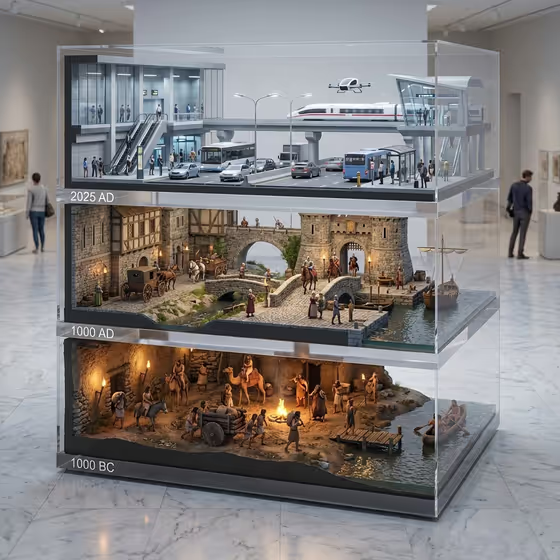
This template builds a stacked acrylic display case that shows one subject changing across three eras. As in the cover image, the layers are labeled 1000 BC, 1000 AD and 2025 AD, each a small diorama-style scene, all inside a clear case on a marble floor.
It suits anyone who wants a museum-style visual about how an object, vehicle, tool or idea has developed over time. Think of educators, history fans, designers making concept pieces, or anyone who wants a shareable timeline image in a portrait 3:4 frame.
What works best as input
- The Scene subject or object field accepts a photo or a typed description, so either a clear picture of your subject or a short phrase works.
- If you upload a photo, pick one with a single, easily recognizable subject. A cluttered background makes it harder to tell what should evolve across the three eras.
- If you type instead, be specific about the thing itself, such as a mechanical device or a distinctive cultural artifact, rather than something vague like stuff or history.
- Choose a subject that has a believable story across ancient, medieval and modern times. The cover example shows transport, from a rowboat and camels to a stone bridge and carts to a train and a bus stop.
How to use it
- Open the template in Phosphene and find the Scene subject or object field.
- Upload a photo of your subject or type a short description, for example a familiar everyday object or a handcrafted keepsake.
- Set Creative direction by picking one of the options such as Clean editorial, Cinematic dramatic, Playful colorful or Quiet premium, or describing your own.
- Generate the image, then check that all three layers read clearly from front to back and that the era labels and the glass case look the way you wanted. Adjust your subject wording or direction and run it again if needed.
Tips for a better result
- Start with Clean editorial or Quiet premium if you want the acrylic and marble look to stay calm and museum-like, and try Cinematic dramatic for moodier lighting.
- Name concrete details in the subject, such as materials or function, so each era can show believable versions of it.
- Try the same subject with different directions to compare the mood, since the layout of three stacked eras stays the same.
- Pick subjects that change a lot over time. A big visual gap between 1000 BC and 2025 AD makes the timeline more interesting.
Common mistakes
- Using a very abstract or tiny subject, which gives the three layers little to show and makes the eras look alike.
- Uploading a busy photo with several competing objects, so the template cannot tell which one should evolve.
- Leaving the creative direction too vague or contradictory, such as asking for both playful colorful and quiet premium, which can muddy the final look.
FAQ
Do I have to upload a photo?
No. The Scene subject or object field accepts either a photo or a typed description, so you can use whichever you have.
What do the three layers show?
They show your subject across three eras, labeled 1000 BC, 1000 AD and 2025 AD, stacked in a clear acrylic case from front to back.
What shape is the result?
The output is a single image in a 3:4 portrait aspect ratio.
Can I use something other than a vehicle?
Yes. The subject field suggests things like a keepsake, an everyday object, a mechanical device or a cultural artifact, though the cover example happens to show transportation.