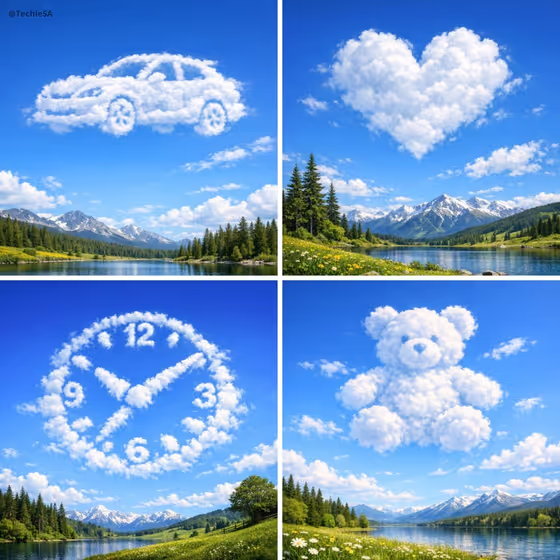
Cloud Shape Horizon makes a realistic sky scene where soft clouds gather into a silhouette you choose, floating above a landscape. Think a heart, a teddy bear, a car or a clock built from puffy white clouds against a bright blue sky, as in the cover collage.
It is for anyone who wants a calm, shareable nature image with a playful twist, such as a greeting card visual, a wallpaper, a social post or a themed illustration. You fill in three fields and the template handles the composition.
What works best as input
- There is no photo upload here. All three fields are filled in with text or a choice, so your effort goes into describing the shape clearly.
- In Cloud shape design, name one simple, recognizable object, such as a soaring whale, a peaceful dove, a heart or a sailing ship. Simple outlines read best when they are made of clouds.
- Add a short adjective if you want attitude, for example peaceful, soaring or sailing, since the examples show how a little motion word shapes the pose.
- Pick Landscape below and Daylight mood to match the feeling you want, such as Rolling green hills with Crisp optimistic morning, or Calm tropical coastline with Warm late-afternoon glow.
- Avoid long lists of objects in the shape field. One clear silhouette gives the clouds room to form it.
How to use it
- Open the Cloud Shape Horizon template in Phosphene.
- Type your idea into Cloud shape design, for example a soaring whale or a heart.
- Choose a Landscape below and a Daylight mood from the options.
- Generate the image, then check that the cloud silhouette is recognizable and the landscape sits clearly in the lower frame. Adjust a field and generate again if needed.
Tips for a better result
- Try the same shape with different daylight moods to see how sunlit highlights and sky color change the feel, for instance Fresh post-rain clarity versus Soft peaceful midday.
- Match the shape to the landscape for a story, such as a sailing ship over a coastline or a dove over a golden mountain valley.
- Choose shapes with a bold, easy outline (a heart, a bear, a whale) when you want the result to read instantly, and more detailed objects when you want a challenge.
- Run several variations with small wording changes in the shape field and keep the one where the clouds look most natural.
Common mistakes
- Describing a very complex or abstract shape. Clouds suggest a form softly, so fussy details tend to get lost.
- Cramming several objects into the shape field, which can leave the clouds without one clear silhouette.
- Expecting a hard-edged object. The template is built so clouds only suggest the shape organically, so judge the result by how recognizable it feels, not how crisp it is.
FAQ
Do I need to upload a photo?
No. This template takes no photo. You type the cloud shape and pick the landscape and daylight mood.
What kinds of shapes work well?
Simple, familiar silhouettes such as a whale, a dove, a heart or a sailing ship. The cover also shows a car, a clock and a teddy bear.
What aspect ratio will I get?
The template outputs a 16:9 image, a wide landscape frame with the clouds in the upper scene and the landscape below.
Why do the clouds not look perfectly sharp?
The look is intentionally soft and organic. The clouds are meant to suggest the shape naturally rather than form a hard-edged object.