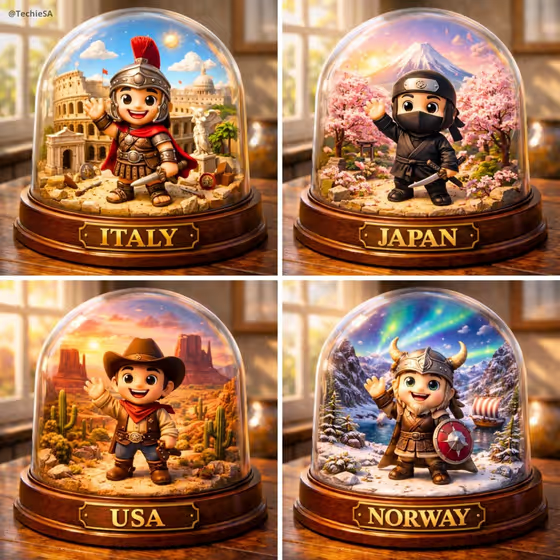
Culture Dome Portrait turns a country and a cultural figure into a collectible-style glass dome. The figure stands large in the foreground, waving, with miniature landmarks behind it and a wooden base with a gold plaque. The cover shows the idea well: four domes, each with a different costume, scenery and plaque name.
It suits travel lovers, teachers, bloggers and anyone who wants a souvenir-style image tied to a place. Because the figure is meant to be a respectful, handcrafted take on a culture, it works best when you describe the country and figure with care.
What works best as input
- In the Country and cultural figure field, name both the country and the figure, for example "Japan with a kimono artisan" or "India with a classical dancer". Naming both gives the template a clear subject and a matching set of landmarks.
- This field also accepts a reference photo. If you add one, pick a clear image of the costume or figure you want represented, and keep the text description alongside it so the country is unambiguous.
- Be specific about the figure's role or outfit (a folkloric dancer, a traditional musician) rather than writing only the country name. Specific roles give the miniature figure a more recognizable look.
- In Country plaque name, type the exact name you want engraved, such as JAPAN or MOROCCO. Capital letters match the examples and the look of the plaque on the cover.
How to use it
- Open the Culture Dome Portrait template in Phosphene.
- Fill in Country and cultural figure with a short description like "Mexico with a folkloric dancer", and add a reference photo there if you want to guide the look.
- Choose a Dome setting (for example Window-lit wooden table or Golden-hour travel display) and type the Country plaque name exactly as it should appear.
- Generate the image, then check the plaque spelling, the figure and the landmarks. Adjust your inputs and run it again if something is off.
Tips for a better result
- Try the same country with different figures, such as a dancer in one version and a musician in another, to build a matching set like the four-dome grid on the cover.
- Switch the Dome setting to change the mood. A dark museum display feels dramatic, while a sunlit studio shelf feels bright and friendly.
- Keep the plaque name short and in capitals so the gold lettering stays bold and readable.
- If the landmarks do not feel right, add a hint of a place or era to the figure description, such as a region or traditional costume.
Common mistakes
- Writing only a country name with no cultural figure, which leaves the foreground character vague.
- Misspelling the plaque name or adding long text. The plaque is meant to hold the exact country name, so keep it brief and double-check the spelling.
- Combining several countries or many figures in one description. The template is built around one figure and one country per dome.
FAQ
Do I have to upload a photo?
No. You can describe the country and cultural figure in text. The Country and cultural figure field also accepts a reference photo if you want to add one.
What does the plaque say?
It shows the text you enter in Country plaque name, rendered in gold on the wooden base. Type the country name exactly as you want it to appear.
Can I change the lighting and background?
Yes. The Dome setting field lets you choose options such as Window-lit wooden table, Dark museum display, Sunlit studio shelf or Golden-hour travel display.
What shape is the result?
The template produces a single image in a 3:4 portrait ratio, showing one glass dome on its plaque.