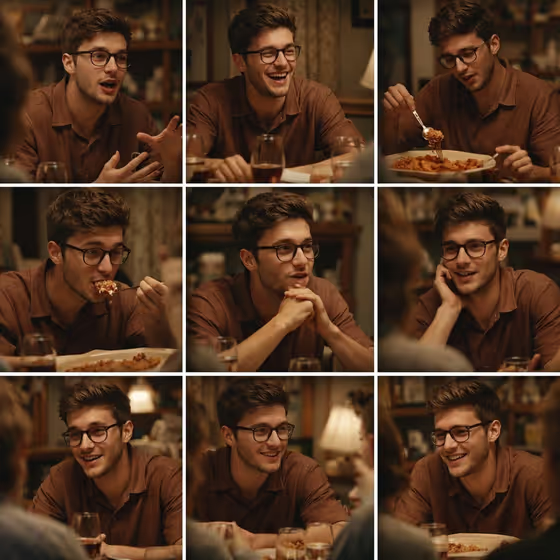
Dinner Storyboard turns one subject into a nine-panel contact sheet of a single dinner scene. The cover shows the idea well: the same person at a wooden table, talking with his hands, laughing, eating pasta, listening and smiling, all in warm evening light.
It suits anyone who wants a candid, film-still look for a portrait series, a character study or a mood board. Because all nine frames share one outfit, one room and one lighting setup, the result reads like frames pulled from a single moment rather than nine separate pictures.
What works best as input
- The Subject field accepts a photo reference or a written description, so you can use whichever is easier. A clear, well-lit photo of the person gives the template the most to hold onto for continuity.
- Choose a photo where the face is fully visible and not hidden by sunglasses, a hat brim or heavy shadow. Glasses are fine if they are part of the look, as the cover shows.
- If you describe instead of uploading, be concrete about the person: age range, hair, facial features and mood. Something like 'A confident adult' is a starting point, and more detail gives more consistent panels.
- Only use photos of yourself or people who have agreed to it, and keep the description respectful.
How to use it
- Open the Dinner Storyboard template in Phosphene.
- In the Subject field, describe the person or add a photo reference of them.
- Pick an option in the Setting field. It is required, so choose the backdrop that fits the mood you want.
- Generate, then look over the 3:4 contact sheet. Check that the person looks like the same individual in all nine panels and that the grid is cleanly separated.
Tips for a better result
- Pick a face-forward reference photo with natural expression. The template is built around talking, laughing and listening, so a relaxed look carries across the panels.
- Try different Setting options to see how the same dinner sequence changes with a different backdrop.
- Vary the Subject description between runs (for example a poised creative professional versus a charismatic performer) to see how the character comes across.
- Keep your Subject text short and visual. Details about hair, glasses and clothing help more than abstract personality words.
Common mistakes
- Uploading a blurry, tiny or heavily filtered photo, which makes it harder to keep the face consistent across all nine panels.
- Leaving the Subject vague. A one-word or generic description gives the template little to keep consistent from panel to panel.
- Expecting a single hero image. This template makes a grid of nine small frames, so judge it as a contact sheet, not as one large portrait.
FAQ
Do I have to upload a photo?
No. The Subject field takes a written description or a photo reference, so you can use either.
What does the output look like?
A 3:4 image holding a 3x3 grid of nine candid dinner moments, such as talking, laughing, eating and listening, in one continuous scene.
Will the same person appear in every panel?
The template is designed for subject continuity across the grid. A clear reference photo or a detailed description helps keep the person consistent.
What is the Setting field for?
It lets you choose the backdrop for the variation, for example a clean studio or a refined architectural interior.