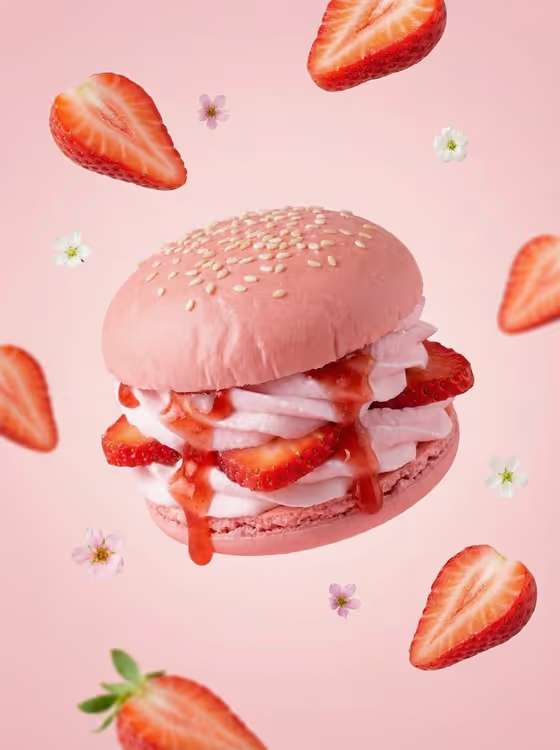
Fruit Dessert Burger turns a simple idea into a styled hero image: a dessert built like a burger, with soft pastel buns, airy whipped cream, fresh fruit slices and a glossy sauce drip. The cover shows the look, a sesame-dotted blush bun stacked with strawberry slices and cream, floating in the air with halved berries and tiny blossoms around it.
It suits bakers, cafe owners, food bloggers and anyone who wants a clean, centered dessert visual in a 3:4 frame. You describe the dessert, pick a fruit and a pastel palette, and the template handles the styling, lighting and floating details.
What works best as input
- In the Dessert Burger Product field, describe the dessert in a short phrase such as 'a strawberry dessert burger' or 'a peach dessert burger'. The field also accepts a reference photo if you want to guide the look.
- If you add a reference photo, use a clear, well-lit shot of the dessert or a similar one, with the subject easy to see and not cropped.
- Keep the description focused on the dessert itself. The fruit and color choices have their own dropdowns, so you do not need to repeat them in a long sentence.
- Match your description to the Featured Fruit you pick, so the product name and the fruit slices and sauce agree with each other.
How to use it
- Open the Fruit Dessert Burger template in Phosphene.
- Fill in Dessert Burger Product by typing a short description or adding a reference, then choose a Featured Fruit such as Strawberry, Mango, Blueberry or Peach.
- Pick a Pastel Color Palette (Blush pink, Mango yellow, Blueberry lavender or Peach cream), which sets the bun, background and floral accent color.
- Generate the image, then review the 3:4 result and adjust your inputs if you want a different fruit or color mood.
Tips for a better result
- Pair the fruit and palette on purpose: Strawberry with Blush pink, Mango with Mango yellow, Blueberry with Blueberry lavender and Peach with Peach cream give a cohesive, single-tone look like the cover.
- Try the same dessert description with different palettes to build a matching set of images for a menu or social feed.
- Keep the product description simple and specific, since the template already adds the cream, sauce, sesame buns, floating fruit and flowers.
- If a result feels off, change one input at a time (fruit, then palette, then wording) so you can see what made the difference.
Common mistakes
- Writing a very long description that fights the template's fixed styling, such as asking for a busy table scene when the template is built around a clean, centered hero.
- Choosing a fruit that does not match the dessert description, for example describing a mango burger but selecting Blueberry.
- Uploading a cluttered or dark reference photo, which gives the template little to work from.
FAQ
Do I have to upload a photo?
No. The Dessert Burger Product field is a text description, and it can also take a reference photo if you want to add one.
What fruits and colors can I choose?
Featured Fruit offers Strawberry, Mango, Blueberry and Peach. Pastel Color Palette offers Blush pink, Mango yellow, Blueberry lavender and Peach cream.
What shape is the output?
The template creates a single image in a 3:4 aspect ratio, with the dessert centered.
Can I mix a fruit with a different palette?
Yes, the two dropdowns are independent, so you can pair them however you like. Matching them tends to look closest to the pastel, single-tone style on the cover.