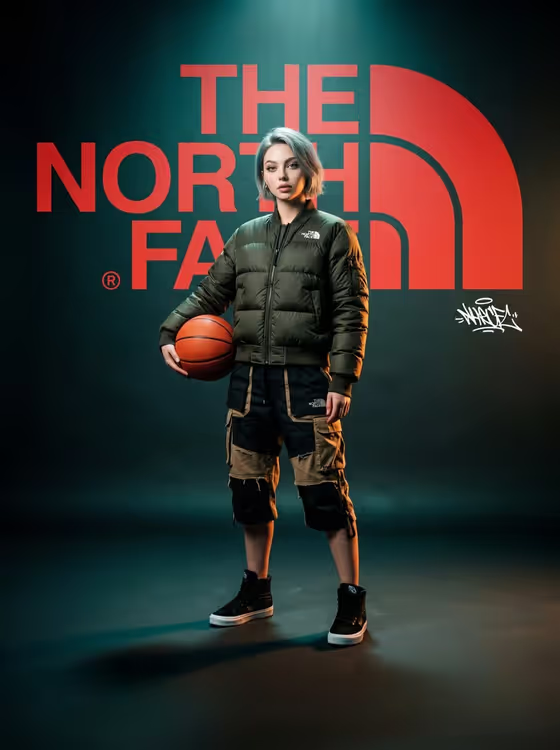
This template builds a moody streetwear campaign poster in a 3:4 frame. A full-body subject in layered techwear stands in front of a giant red logo wall, lit with teal haze and a warm rim light from the right, with heavy film grain and a small white graffiti signature off to one side.
It suits anyone who wants a concept fashion poster: creators styling a personal brand shot, designers mocking up a campaign idea, or fans picturing themselves in a gritty lookbook scene. It is a concept poster, so treat it as a creative visual rather than an official brand asset.
You set four things: the brand name for the wall, who the subject is, the streetwear look, and one simple prop held at the hip.
What works best as input
- The template asks for 2 or more photos, so give it a few clear references. The Campaign subject and Campaign prop fields can take a photo, which helps the result match a real person or a specific object.
- For the Campaign subject, use photos where the face is well lit and unobstructed, ideally from slightly different angles. Avoid heavy filters, sunglasses, or group shots where it is unclear who the subject is.
- Only use photos of yourself or people who have agreed to appear. Keep the subject as a real person you have permission to depict.
- If you skip a photo, write a short description instead, like the placeholder 'a confident woman' or 'a young athlete'. Specific but simple wording works better than long backstory.
- For the Brand name, type the label in capitals as it should read on the wall (for example THE NORTH FACE or SUMMIT LAB). The field help also notes you can supply an exact logo reference if you want the wordmark to be faithful.
How to use it
- Open the Gritty Streetwear Brand Poster template in Phosphene and start a new generation.
- Fill in Brand name with the label for the logo wall, then set Campaign subject by describing the person or adding your photos.
- Choose a Streetwear look (for example olive puffer and layered techwear or black shell and distressed cargos) and a Campaign prop such as an orange basketball or a climbing rope coil.
- Generate the poster, then check the logo text, the prop at the hip, and the full-body pose. Adjust one field at a time and run it again if something is off.
Tips for a better result
- Pick a prop that contrasts with the dark teal scene. A bright object like an orange basketball or a bright utility duffel stands out against the muted background.
- Try the different Streetwear look options to change the whole mood: olive puffer reads outdoorsy, black shell with distressed cargos reads darker, rust bomber and shorts adds warmth.
- Use a short, invented brand name like SUMMIT LAB or URBAN RANGE if you want a fresh concept brand instead of an existing label.
- Change only one field per run so you can tell which change improved the poster.
Common mistakes
- Writing the brand name in a long phrase or with extra words. The wall logo works best with a short label, entered clearly.
- Uploading only one blurry or heavily filtered photo for the subject, which gives the poster less to work from.
- Choosing a large or complicated prop. The template expects a simple contrasting object held at the hip.
FAQ
Do I have to upload photos?
The template is set up for 2 or more photos, but the Campaign subject and Campaign prop fields also accept a text description, so you can describe them if you prefer.
What size is the poster?
It is generated as a 3:4 portrait image, suited to a poster or vertical post.
Can I use any brand name?
You can type any label into the Brand name field, including invented ones like ALTITUDE. The result is a concept poster, not an official campaign.
Can I change the red logo or the lighting?
No. The red oversized logo, teal haze, warm right-side rim light, film grain, and small white graffiti signature are fixed parts of this template. You control the brand, subject, look, and prop.