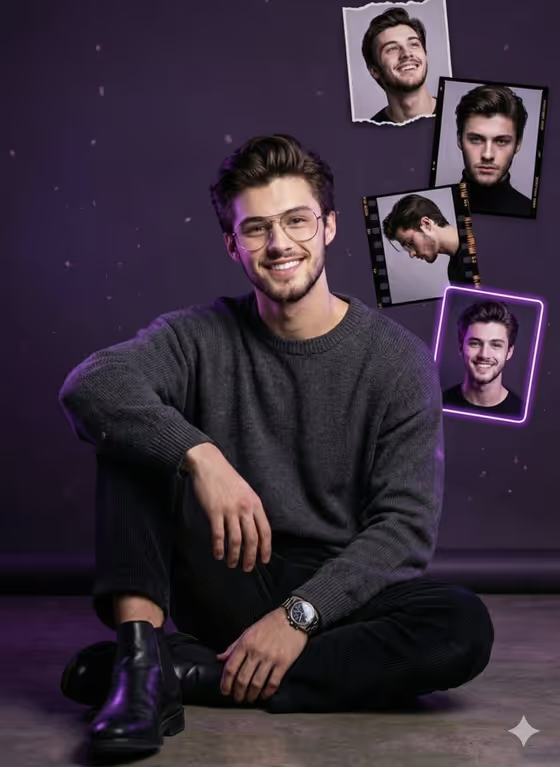
Neon Birthday Portrait turns a single photo of you into a vertical 3:4 birthday poster. You sit casually on the floor in the center while smaller framed snapshots of the same person float around you, set against a deep-purple background with soft particles and a purple-white glow.
It suits anyone who wants a birthday post, invitation visual or keepsake poster that feels like a styled studio shoot. You give it a subject and a headline, and the template handles the layout, the frame styles (torn paper, film negative, neon edge) and the lighting.
What works best as input
- The Birthday Product Person field accepts a photo reference as well as a text description, so use a clear photo of the person who should appear in the poster.
- Pick a photo where the face is well lit, in focus and fully visible. The poster repeats the same identity in the floating frames, so a sharp face gives the best consistency.
- If you describe instead of uploading, be specific about the look, like the sample 'a smiling young man with glasses'. Details such as glasses or a confident expression carry into the result.
- Choose a photo with a friendly, direct expression. The template aims for a direct gaze and a celebratory mood, so a very serious or turned-away photo may fight that direction.
- Write the Birthday Headline Text exactly as you want it to read, in short capitals, such as HAPPY BIRTHDAY or MAKE A WISH. This field is text only, so type it rather than uploading anything.
How to use it
- Open the Neon Birthday Portrait template in Phosphene.
- In Birthday Product Person, add your photo reference or describe the person, for example 'a cheerful creative professional'.
- In Birthday Headline Text, type the exact words for the neon headline, or start from an example like CELEBRATE YOU.
- Generate the poster, then check the face, the headline spelling and the floating frames. Adjust your inputs and generate again if something is off.
Tips for a better result
- Keep the headline short. Two to four words, like YOUR YEAR STARTS NOW, are easier to render cleanly than a long sentence.
- Try the example headlines (MAKE A WISH, CELEBRATE YOU) to change the tone of the poster without touching the subject.
- Vary the subject wording to change the vibe, such as 'a confident woman celebrating' or 'a stylish mature birthday subject'.
- The look is built around dark, understated clothing and a purple palette, so you do not need to describe outfits or colors in detail.
Common mistakes
- Typing a long or vague headline. The template uses your headline as exact text, so extra words or typos can show up on the poster.
- Using a blurry, heavily cropped or group photo as the reference. A poster built around one person needs one clear face.
- Describing multiple people in the subject field. The design is a single seated portrait with frames of the same identity, so extra people work against the layout.
FAQ
Can I upload a photo for this template?
Yes. The Birthday Product Person field accepts a photo reference, and you can also describe the person in text instead.
Can I choose my own headline?
Yes. Birthday Headline Text is a required text field, and you can type your own wording or use an example like HAPPY BIRTHDAY.
What shape is the poster?
It is a vertical image in a 3:4 aspect ratio.
Will the floating frames show the same person?
The template is directed to keep the same identity across the main portrait and the floating snapshots, so a clear source photo helps.