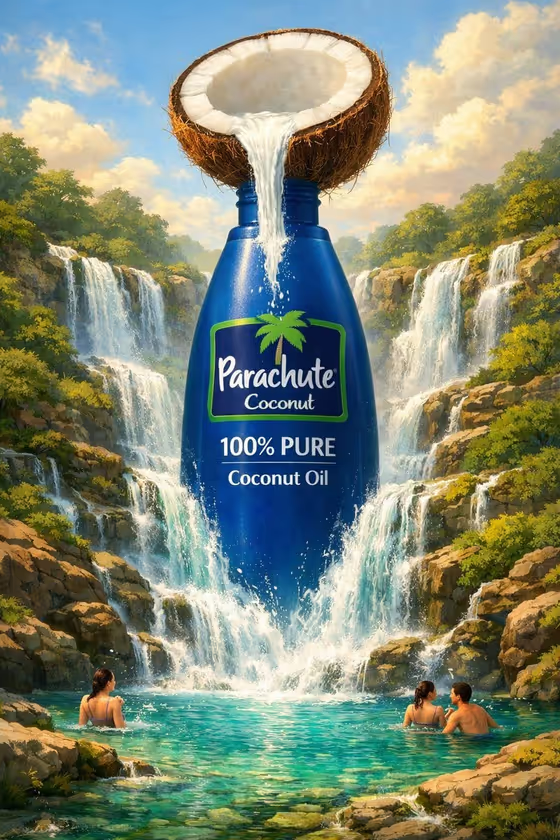
Ingredient Landscape Ad turns a single oil product into a surreal advertising image. Your bottle becomes a colossal centerpiece set inside a landscape built from its own ingredient, with tiny people nearby to show how big everything is. In the cover example, a coconut half pours into a huge blue bottle while waterfalls tumble through green, rocky cliffs into a turquoise pool.
It suits brands, small producers and marketers who want a concept visual for an oil product without staging a shoot. You provide the product, the exact brand name, the main ingredient and a landscape flow style, and the template handles the terrain, vegetation, palette and lighting.
What works best as input
- For Oil product, you can describe the package in words (for example, a coconut oil jar) or add a reference photo of the real bottle. A clear photo with the label facing the camera gives the template the best look at your packaging.
- Type the Brand name exactly as it appears on the package, including capitalization and symbols such as the ampersand in GROVE & GOLD. This field is text only, so no photo is needed there.
- For Primary ingredient, name one specific ingredient, such as fresh coconuts or ripe green olives, or add a prop photo of it. Specific wording helps the terrain, plants and colors follow that ingredient.
- Because the template asks for 2 or more photos, add reference photos for the product and the ingredient when you have them. Use clean, well lit shots without clutter in the background.
How to use it
- Open the Ingredient Landscape Ad template in Phosphene.
- Fill in Oil product, Brand name and Primary ingredient. Add reference photos to Oil product and Primary ingredient if you have them.
- Pick a Landscape flow option, such as Cascading waterfalls, Winding rivers, Reflective pools or Terraced streams.
- Generate the image, then check that the bottle, brand text and ingredient landscape look the way you intended. Adjust your inputs and run it again if something is off.
Tips for a better result
- Try the same product with different Landscape flow choices. Waterfalls give dramatic motion, while Reflective pools or Terraced streams give a calmer, more orderly scene.
- Keep the ingredient singular and concrete. Swapping ripe green olives for toasted sesame seeds changes the whole palette and texture of the terrain.
- Check the label on your reference photo before generating. If the label is readable in the photo, it is easier to match it in the result.
- Use the examples in each field (an olive oil bottle, a sesame oil bottle, an avocado oil bottle) as a model for how short and clear your descriptions should be.
Common mistakes
- Entering a vague or misspelled Brand name. Since the brand text appears on the bottle, check spelling and capitalization before you generate.
- Listing several ingredients in Primary ingredient. The landscape is built from one ingredient, so a mixed list can muddy the terrain and colors.
- Using a blurry, dark or cropped product photo as the Oil product reference, which gives the template little to work with.
FAQ
Do I have to upload photos?
The template is set up for 2 or more photos, and Oil product and Primary ingredient both accept a photo. You can also describe them in text, but references help match your real packaging and ingredient.
Can it work for products other than oil?
The template is built around packaged oil, as the Oil product field suggests. Examples include olive, coconut, sesame and avocado oil.
What does the Landscape flow setting change?
It decides how the ingredient moves through the scene and below the bottle. The options are Cascading waterfalls, Winding rivers, Reflective pools and Terraced streams.
Will the people in the image look like specific individuals?
The template adds tiny people for scale, and they are part of the illustration rather than anyone you specify. They are small figures meant to show how large the bottle and landscape are.