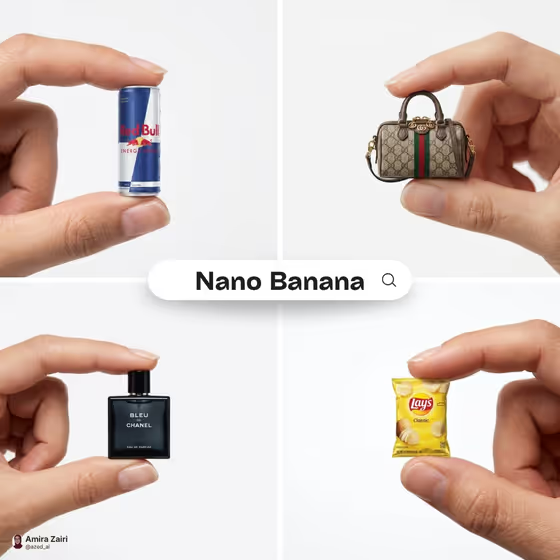
Miniature Product Pinch turns a product into a tiny, hyper-detailed version held between a person's thumb and index finger. The result is a clean, white-background studio shot with soft shadows and a shallow depth of field, in the style of minimalist luxury advertising.
It suits anyone who wants a playful, eye-catching product visual: small brands, creators, and designers who want a single scroll-stopping image of a drink can, bag, perfume bottle, snack pack, or sculptural object. The output is a 3:4 image.
What works best as input
- Upload one clear photo of the exact product you want shrunk. The template accepts a single image, so pick the one that shows the item best.
- Choose a photo where the product is fully visible, with its label, logo, and shape easy to read, since the template aims for brand-accurate detail.
- Use a photo with even lighting and no heavy clutter around the product, so the item reads clearly when it is placed in the fingers.
- If you describe instead of uploading, be specific in the Miniature product field, for example the type of item, its colors, and its packaging, rather than just a general category.
How to use it
- Open the Miniature Product Pinch template in Phosphene.
- In the Miniature product field, upload a photo of your item or describe it. You can also start from an example such as "a miniature version of my exact product".
- Generate the image and wait for the 3:4 result to appear.
- Review the output. Check that the product looks small, centered, and held naturally between thumb and finger, then adjust your input and generate again if needed.
Tips for a better result
- Pick products with a strong, recognizable silhouette, like a can, bottle, bag, or small pack. They tend to read clearly when held in a pinch.
- Keep the description focused on one item. A single clear subject fits the centered, shallow depth of field composition.
- Try the example phrasings, such as "a sculptural design object" or "a premium consumer product", to explore different styles of item.
- Run the same product a few times and compare. Small changes in how the product is shown or described can change the result.
Common mistakes
- Uploading a photo with several products or a busy background, which makes it unclear which item should be shrunk.
- Using a vague description like "a thing" or "my product" with no photo, which gives the template little to work with.
- Expecting exact text or logos to match perfectly from a blurry or low-detail source photo. A sharper source gives the template more to follow.
FAQ
Do I need to upload a photo?
The Miniature product field accepts a photo or a text description. Uploading a photo of your exact item is the best way to keep the product looking like yours.
What kind of image do I get?
A 3:4 photograph-style image of a miniature product pinched between a thumb and index finger on a clean white studio background.
Can I use any kind of product?
The cover examples show a can, a handbag, a perfume bottle, and a snack pack, but the field also lists options like a premium consumer product or a sculptural design object. Choose something that has a clear shape.
Can I change the background or the hand?
No. The template is set up for a white studio backdrop and a well-groomed hand, so your input only controls the product.