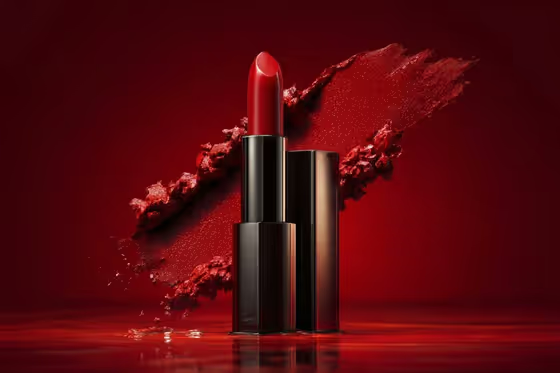
Minimal Gradient Product Studio turns a single product into a clean, premium studio image in a 3:4 frame. The product sits alone on a smooth gradient backdrop with a soft reflection or contact shadow, lit with diffused, high-key commercial light.
It suits sellers, small brands and designers who want a polished hero shot without props or clutter. Because the direction keeps one isolated object with plenty of negative space, it works best when the product is the only thing you want the viewer to see.
What works best as input
- In the Product field you can either describe the object or upload the exact product reference. Upload a photo when you need the result to match a specific item, and describe it when you only need a similar style of object.
- Use a clear photo of the product by itself, with its full shape visible and no hands or other items in the frame.
- If you describe instead, be concrete about shape and material, like the examples "a sculptural skincare bottle" or "a polished beverage can".
- Choose a gradient that complements the product color. The cover shows a deep red lipstick against a red field, so tone-on-tone can look rich, while contrast can make the object pop.
- Surface reflection is a text field, so write a short phrase such as "soft polished reflection" or "matte contact shadow only" to control how the product meets the surface.
How to use it
- Open the Minimal Gradient Product Studio template in Phosphene.
- Fill in Product by describing the object or uploading your product reference photo.
- Set Gradient background (for example "warm ivory to peach" or "charcoal to soft black") and Surface reflection (for example "barely visible satin reflection").
- Generate the image, then review the focus, the reflection and the backdrop falloff, and adjust your fields and run it again if needed.
Tips for a better result
- Pair reflection to material. Glossy or glass products suit "subtle glass reflection" or "soft polished reflection", while matte items often look better with "matte contact shadow only".
- Try the same product across several gradients, such as "cool grey to blue" and "sage to cream", to build a consistent set of variations for a catalog or campaign.
- Keep your wording short and specific. The template already handles the lighting and composition, so your fields should only describe the product, backdrop and surface.
- For darker moods, choose a deep gradient like "charcoal to soft black" and a restrained reflection so edge highlights on the product stand out.
Common mistakes
- Describing extra props, scenery or multiple objects. The template is built around one isolated product with no extra props, so added items work against it.
- Using a cluttered or partially cropped reference photo, which makes it harder to keep the product shape accurate.
- Writing vague entries like "nice background" instead of a clear gradient pairing, which gives the backdrop less direction.
FAQ
Do I have to upload a photo?
No. The Product field accepts either a text description of the object or an uploaded reference photo. Upload one when you want the exact product represented.
Can I add props or a second product?
The template is designed for a single product with no extra props and ample negative space, so it is not the right fit for multi-item scenes.
What does the Surface reflection field control?
It describes how the product meets the surface, from a barely visible satin reflection to a matte contact shadow only. Soft natural contact shadows are part of the look either way.
What shape is the output?
The template produces a single image in a 3:4 aspect ratio.