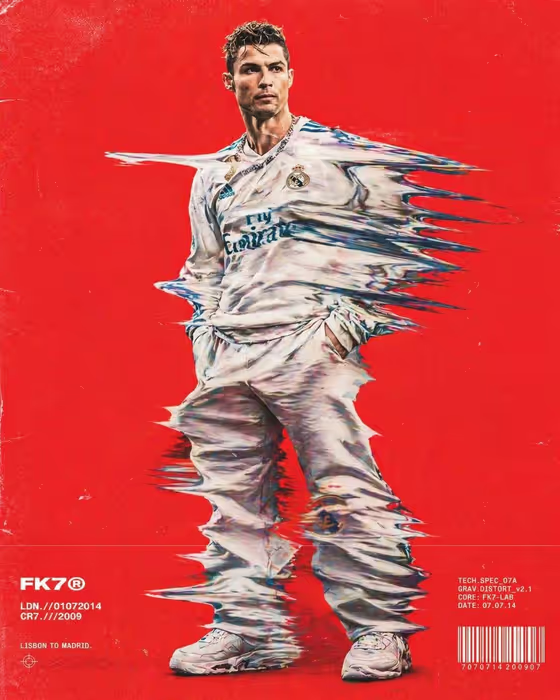
Motion Drag Editorial turns a portrait into a fashion-magazine style image where the subject's clothing is pulled sideways into long, streaked bands, as if the frame was dragged while the shutter was open. The figure stands full-frame against a bold red background with retro film grain, and small technical text and a barcode sit near the bottom like a printed editorial layout.
It suits creators, designers and brands who want a loud, graphic poster look for a campaign, a profile image or a social post. The output is a 3:4 image, so it fits portrait-format feeds and print-style layouts.
What works best as input
- Use a clear, well-lit photo of an adult where the person is standing and visible from head to toe, since the template builds a full-frame standing figure.
- Pick a photo with a simple, readable silhouette. The stretch effect works on clothing, so outfits with visible shape and texture give the streaks more to work with.
- In the Portrait subject field you can attach one reference photo or describe the subject in words, for example 'an expressive adult creative'. Keep the description short and concrete.
- Avoid heavily cropped or cluttered photos. A clean background in the source makes the subject easier to isolate against the red field.
How to use it
- Open the Motion Drag Editorial template in Phosphene.
- In Portrait subject, upload your photo or type a short description of the person. The default 'an adult subject matching my reference' works well when you upload a photo.
- In Pose or expression, keep 'the source pose and energy' or choose another option such as 'calm editorial stillness' or 'confident direct presence'.
- Generate the image, then review the stretched clothing, red background and layout details. Adjust the pose option and run it again if you want a different feel.
Tips for a better result
- Try 'candid spontaneous energy' versus 'calm editorial stillness' to change the mood while the red backdrop and drag effect stay the same.
- If your reference photo already has a strong pose, keep 'the source pose and energy' so the streaks follow a gesture you chose.
- Light-colored or patterned clothing tends to make the stretched streaks easier to see against the red.
- Generate a few versions and compare them, since the exact streak pattern and small technical text can vary between runs.
Common mistakes
- Uploading a tight face crop. The template is built around a full-frame standing figure, so a close-up leaves little for the drag effect to stretch.
- Writing a long, detailed scene description in the subject field. The background, grain and layout are already fixed, so extra scene instructions add confusion rather than control.
- Expecting the small technical text and barcode to read exactly as you want. They are decorative layout elements, so treat them as part of the style rather than editable copy.
FAQ
Do I have to upload a photo?
No. The Portrait subject field accepts either a photo or a text description, so you can describe an adult subject instead.
Can I change the red background?
The bold red backdrop is part of the template's fixed direction, so this template is designed to keep it.
What format is the result?
It produces a single image in a 3:4 portrait aspect ratio.
What does the Pose or expression option do?
It sets the attitude of the figure. You can keep the pose from your source or choose a mood like confident direct presence or candid spontaneous energy.